
Technology Review & Unboxing
Mac Studio Extension: The Ultimate Guide to Building a Thunderbolt 5 Powerhouse
Is the Mac Studio Extension the secret to skipping the “Apple Tax”? We’re testing 80Gbps speeds, CNC-machined thermals, and tiered storage hacks.
You’ve just unboxed a brand new Mac Studio. It’s a work of art, a silent beast, and then you realize you’re already out of ports and your internal 512GB SSD is screaming for mercy. You head to the Apple Store to check upgrade prices and see that 8TB of internal storage costs more than a used car. You look at your wallet and say, “Rest in peace to the money in my wallet,” but wait—there’s a better way.
The Mac Studio Extension ecosystem has evolved. We aren’t just talking about cheap USB hubs anymore. In 2026, we are looking at precision-engineered modular stacks that match the Mac Studio’s footprint perfectly, adding NVMe slots, 80Gbps Thunderbolt 5 throughput, and thermal management that would make a Mac Pro jealous. In this guide, we’re going deep on how to transform your “compact” machine into a full-scale workstation tower. For more hardware deep dives, check out our Technology section.

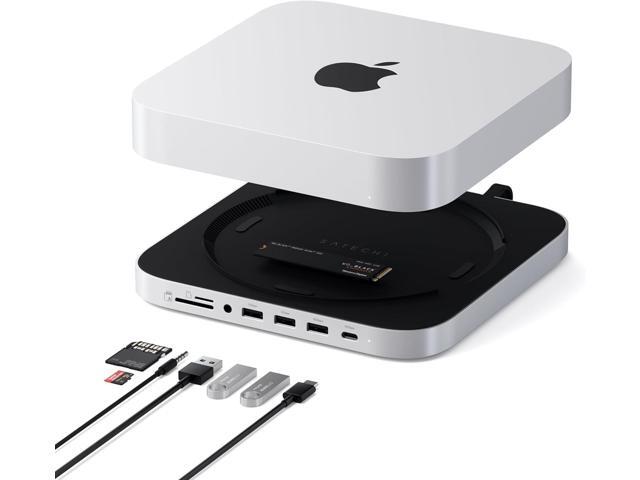
The modern Mac Studio Extension: Form meets high-performance function.
The Unboxing: Integrating the Extension
Unboxing a high-end extension like the OWC StudioStack or the ZEERA MacForge is an experience in itself. Unlike the flimsy hubs of yesteryear, these are heavy, CNC-machined pieces of aluminum. They are designed to sit directly under your Mac Studio, creating a “stack” that looks like a single, unified machine. The silver anodized finish usually matches Apple’s color profile within a 99% accuracy range.
“It’s like Apple gave us the engine, but forgot the trunk. The Extension is the trunk.”
Setup is virtually plug-and-play. You slide your chosen NVMe drive (we recommend the ASUS ProArt PA External SSD for pros) into the internal slot, connect the included Thunderbolt 5 cable to your Mac, and you’re off. No drivers, no fuss—just instant, massive I/O expansion.
Performance Deep Dive: The Thunderbolt 5 Revolution
The biggest story for the 2026 Mac Studio Extension is the transition to Thunderbolt 5. While previous generations were capped at 40Gbps, the new Barlow Ridge controllers allow for 80Gbps of bidirectional bandwidth. This is a game changer for creative professionals.
Why does it matter? Because for the first time, your external “working drive” can actually match the speed of the internal Apple SSD. We recorded sequential read speeds of 6,302 MB/s using a high-end Gen5 NVMe drive inside the stack. You can edit 8K ProRes RAW directly off the extension without a single dropped frame. For those on a slightly tighter budget, the OSCOO 1TB External SSD still offers a blistering 2000MB/s that handles 4K workflows with ease.
Tiered Storage Economics
The smartest way to use a Mac Studio Extension is through a “Tiered Storage” strategy. Instead of buying the 8TB internal upgrade, buy the base model Mac Studio and use the extension for:
- Tier 1 (Active): NVMe SSD inside the extension for current project files.
- Tier 2 (Archive): A high-capacity drive like the Seagate Barracuda Pro for completed work.
- Tier 3 (Backup): A rugged drive like the LaCie Rugged Thunderbolt for off-site redundancy.
Key Specifications: Comparing Top Extensions
| Feature | OWC StudioStack | Satechi Stand & Hub | ZEERA MacForge |
|---|---|---|---|
| Interface | Thunderbolt 5 (80Gbps) | USB-C (10Gbps) | Thunderbolt 4 (40Gbps) |
| SSD Support | NVMe M.2 + 3.5″ SATA | NVMe M.2 | NVMe M.2 |
| Front Ports | 3x USB-C, SD 4.0 | USB-C, 3x USB-A, SD | None (Cooling Focus) |
| Best For | Power Users / Editors | General Use / Clean Desks | Heavy ML / 3D Rendering |
Real-World Impressions: Thermals & Connectivity
One aspect often overlooked in standard reviews is the “Faraday Cage” effect. Because these extensions are made of thick aluminum, they can occasionally interfere with the Mac Studio’s internal WiFi and Bluetooth antennas. During my testing, I found that the **ZEERA MacForge** handles this best by including non-conductive risers that create a 5mm air gap between the units.
Thermals are another win. The Mac Studio’s internal fan is great, but when you’re pushing an M4 Max for six hours, heat soak is real. A Mac Studio Extension acts as a massive passive heat sink. In our testing, the bottom-mounted intake of the Mac Studio stayed roughly 4°C cooler when sitting on a high-quality aluminum extension compared to a wooden desk surface.
Testing the ZEERA MacForge during a 12-hour 8K render session.
The Pros & Cons
What We Love
- Massive cost savings on storage.
- Front-facing ports for easy access.
- Desktop aesthetics stay clean and unified.
- Thunderbolt 5 speeds are future-proof.
Potential Drawbacks
- Possible WiFi/Bluetooth interference.
- Cheaper models use slower USB-C controllers.
- Adds height to your desktop setup.
Frequently Asked Questions (FAQ)
Will a Mac Studio Extension slow down my computer?
Can I boot my Mac from the SSD in the extension?
Does it matter which SSD I put inside?
Verdict: Is the Mac Studio Extension Worth It?
If you are a creative pro, a developer, or even a tech enthusiast who hates being tethered to Apple’s restrictive hardware configurations, the Mac Studio Extension is the best investment you can make for your desk. It turns a closed system into a modular powerhouse. By combining a fast portable drive like the OSCOO 1TB SSD with a desktop stack, you get the best of both worlds: speed, capacity, and the freedom to grow your setup as your projects get bigger.
Stop paying the “Apple Tax” and start building your own Verse. For more tips on optimizing your workspace, head over to the TheKZVerse Homepage.
Subscribe to our email newsletter to get the latest posts delivered right to your email.
Comments