
Category: Technology | Gadgets | Review
Pokémon GO Plus + Review: Auto Catching Great & Ultra Balls Test!
Testing the ultimate official accessory—auto-throwing Great Balls, spinning PokéStops, tracking sleep with Pikachu, and leveling up your mobile gameplay passive style.
If you have been playing mobile AR games for any length of time, you know that the grind in Pokémon GO never truly stops. Between community days, limited-time raid events, special research quests, and constant seasonal updates, keeping your item storage full and your Stardust reserve high can quickly feel like a full-time job. For years, dedicated trainers had to rely on either basic official wristbands or questionable third-party bluetooth devices to auto-spin stops while commuting. However, when Niantic, The Pokémon Company, and Nintendo came together to release the official Pokémon GO Plus + (pronounced “Plus Plus”), the game fundamentally shifted for casual and hard-core players alike.
Here at TheKZVerse, we love exploring gear that blends everyday utility with pure gaming nostalgia. We picked up the device, unboxed it on our YouTube channel, paired it across multiple smartphones, and ran it through weeks of grueling real-world testing. From busy city streets to overnight sleep tracking on the pillow, this hands-free companion promises to automate the tedious parts of the game while giving you direct access to higher catch rates using Great and Ultra Balls. But at an MSRP hovering around $54.99 USD, is it an essential purchase or total overkill? Let us dive into the details to find out.
Unboxing and Hardware Overview: What Comes in the Box?
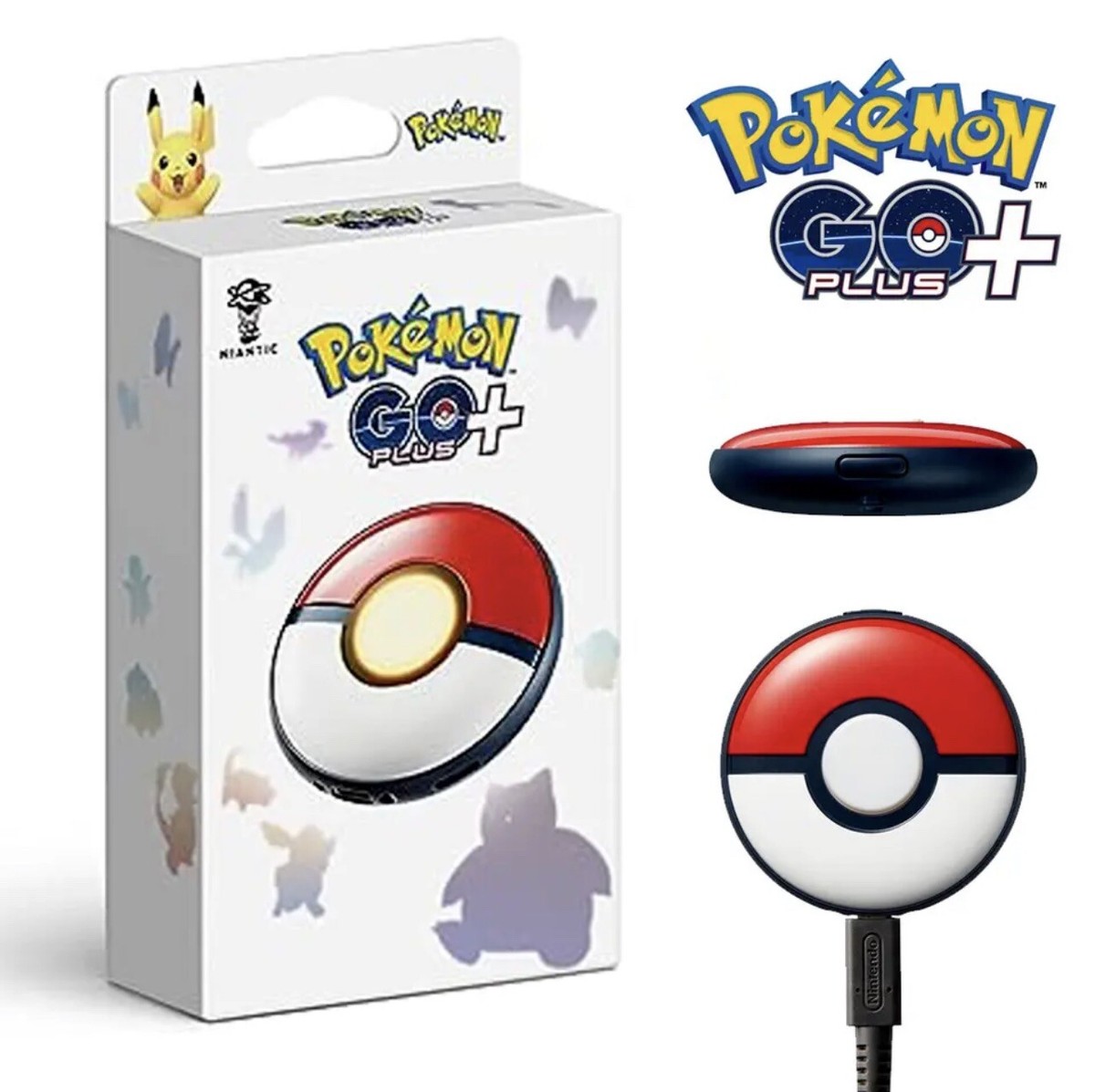
Unboxing the Pokémon GO Plus + reveals a clean, Nintendo-style presentation. Inside the compact box, you get the circular device itself, an official adjustable carrying strap equipped with a magnetic pillow clip for sleep tracking mode, a official USB Type-C to USB Type-A charging cable, and the printed instruction manual. Right out of the box, the immediate tactile feel of the gadget tells you that this is a noticeable upgrade in build quality compared to the original 2016 model.
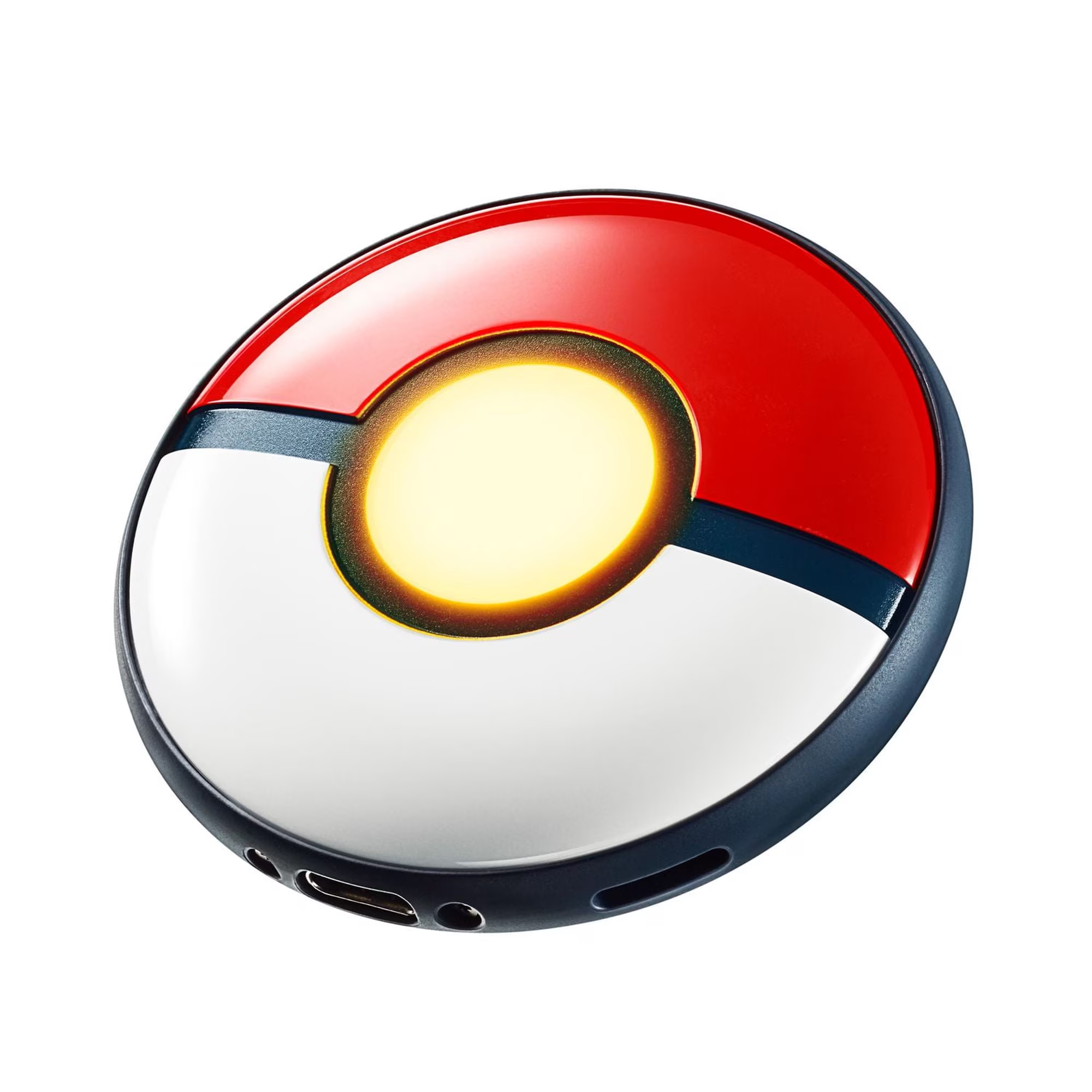
Measuring approximately 64.5 mm in diameter and 18.3 mm in thickness, the Pokémon GO Plus + takes on a iconic flat Poké Ball aesthetic. It weighs roughly 50 grams, giving it a solid, weighted presence in your hand without feeling overly heavy. The top shell features a smooth, glossy white and red design centered around a large primary button surrounded by a multi-color RGB LED ring. On the top edge, you will find a secondary tactile button used for power status checks and pairing, alongside a dedicated lanyard loop hole for securing the included strap.
The back of the device is finished in a soft matte black texture that helps prevent it from sliding around when placed on nightstands or tucked into pockets. Unlike the original GO Plus device which relied on coin-cell CR2032 batteries that required constant tool-assisted replacements, the Plus + houses a internal rechargeable lithium-ion battery. The integrated USB-C port means you can plug it directly into standard wall bricks, power banks, or computer ports. Charging from completely empty to full takes roughly 3.5 hours, granting roughly a full week of gameplay based on two to three hours of daily connected use.
Key Technical Specifications: Pokémon GO Plus + Breakdown
To truly understand how this device sets itself apart from older official hardware like the Poké Ball Plus or classic wristbands, we have compiled the core hardware specifications in the standard table below. Check out our dedicated Gadgets Category for more deep dives into wearable gaming technology.
| Hardware Spec | Technical Feature Details |
|---|---|
| Device Dimensions | 64.5 mm Diameter x 18.3 mm Thickness (Flat Disc Shape) |
| Total Weight | Approximately 50 grams |
| Wireless Connectivity | Bluetooth Low Energy (BLE) 4.2 / 5.0 compatible |
| Internal Battery | Rechargeable Lithium-Ion (USB-C Charging Port) |
| Charging Time & Life | ~3.5 Hours Full Charge; Lasts ~7 days (2-3 hrs daily active use) |
| On-Board Sensors | 3-Axis Accelerometer (Sleep Tracking & Motion Detection) |
| Audio & Feedback | Internal Speaker (Pikachu Voice), RGB LED, Vibration Motor |
| System Compatibility | iOS 13.0+ or Android 8.0+ (Requires Bluetooth & Internet) |
Setting Up the Pokémon GO Plus +: Step-by-Step Configuration
Connecting the Pokémon GO Plus + to your mobile device is straightforward, though understanding the exact menu layout in the application ensures a seamless initial pairing process. First, make sure your smartphone has Bluetooth enabled and that you have updated to the latest version of Pokémon GO available on the Apple App Store or Google Play Store.
Open the Pokémon GO app, tap the main Poké Ball menu icon at the bottom center of your screen, and select Settings in the top right corner. Scroll down until you see Connected Devices and Services, then tap on Accessory Devices. Next, press the small top button on your Pokémon GO Plus + once. The device will vibrate slightly and flash a white LED on the main central button to indicate it is broadcasting a Bluetooth signal. Within a couple of seconds, you will see “Pokémon GO Plus +” pop up under the “Available Devices” sub-menu inside the app. Tap the device icon on your phone screen, wait for the green success prompt, and your device will vibrate twice to confirm a stable link.
Once linked, a small Poké Ball accessory icon will appear on the top right corner of your main in-game map screen. Tapping this icon allows you to instantly toggle the connection on and off without navigating back through deep sub-menus. Keep in mind that per official Bluetooth Low Energy parameters, the game will automatically disconnect the accessory after roughly 60 minutes of active play. This is an intentional background timer meant to preserve both your phone battery and the device battery. Reconnecting takes just a single tap on the map screen icon followed by pressing the physical main button on the Plus + unit.
Gameplay Integration: Auto Catching with Great and Ultra Balls
The single biggest selling point of the Pokémon GO Plus +—and the main reason long-time players are upgrading—is its revolutionary ability to throw Great Balls and Ultra Balls. Previous official hardware strictly limited catches to standard red Poké Balls. Furthermore, older official devices forced you to press a button manually every single time a wild encounter appeared on screen. The Plus + breaks those historical limitations in two major ways.
First, it offers true hands-free Auto-Catch capability using standard Poké Balls. When set to auto-catch mode in the game settings, you can keep your phone locked inside your pocket or backpack while walking. As soon as a wild Pokémon spawns within your trainer circle, the device automatically signals a throw. It attempts a single straight-line throw, calculates the catch RNG, and flashes either multi-color green lights for a success or red pulse lights if the creature flees. You instantly gain XP and Stardust completely passively while going about your day.
Second, if you want a much higher catch percentage on rare or high-CP spawns, you can toggle the app settings to use Great Balls or Ultra Balls. When Great or Ultra Balls are selected, auto-throw turns off for safety reasons so you do not accidentally consume your entire inventory of premier items. Instead, the device operates in manual mode: when a wild Pokémon appears, the central button lights up yellow or green and vibrates with a distinct pulse rhythm. Pressing the central button triggers the throw using your selected ball type. Testing this feature on dense spawns during Community Days resulted in significantly fewer fled Pokémon compared to standard red ball throws!
Auto-Spinning PokéStops and Item Inventory Management
In addition to catching wild spawns, the Pokémon GO Plus + functions as an automatic PokéStop and Gym disc spinner. When auto-spin is toggled on inside the settings menu, approaching any reachable PokéStop or Gym prompts the unit to trigger a spin attempt automatically. The main button flashes blue, vibrates twice, and instantly deposits items directly into your bag storage.
During our testing in urban downtown environments packed with dense stop clusters, the auto-spin response time proved fast and consistent. If you are riding public transit, walking through parks, or sitting near a lured café stop, the device continuously refreshes your supply of Poké Balls, Potions, Revives, Berries, and Field Research tasks. However, inventory management becomes critical when running the Plus + for long periods.
Because the device catches and spins rapidly, it prioritizes Pokémon encounters over stop spinning by default. If you are walking through an area with endless wild spawns, the device will prioritize tossing balls until no wild spawns remain before it turns its attention to spinning nearby PokéStops. If you run completely out of standard Poké Balls while auto-catch is enabled, the device will notify you via a red light sequence. To maximize efficiency, experienced trainers often temporarily disable “Catch Nearby Pokémon” in the accessory settings menu, allowing the Plus + to focus solely on auto-spinning stops to replenish depleted item bags.
Sleep Tracking and Integration with Pokémon Sleep
Beyond active gameplay in Pokémon GO, the Pokémon GO Plus + acts as a dedicated physical tracking sensor for the companion application Pokémon Sleep. Built into the interior circuit board is a sensitive 3-axis accelerometer designed to track body movement and rest quality throughout the night without requiring you to wear a smartwatch or keep your smartphone display powered on on top of your mattress.
Initiating sleep mode is simple: make sure the device is currently disconnected from active Pokémon GO gameplay. Place the Plus + flat near your pillow, press and hold the main central button for about three seconds until the light glows soft blue and Pikachu sings a gentle nighttime lullaby sound clip. Once active, the device monitors your body motion, detecting stages of light sleep, deep sleep, and REM patterns over the course of the night. Minimum sleep sessions require at least 90 minutes of continuous tracking to log valid data.
When you wake up in the morning, press and hold the central button once more to conclude the sleep tracking session. The light glows multi-colored, and Pikachu sings a morning wake-up song clip. Opening the Pokémon Sleep app automatically syncs your overnight data via Bluetooth, rewarding you with sleep scores, research progress, and new Pokémon sleep styles. Even better, syncing your sleep logs back over to Pokémon GO awards exclusive in-game bonuses, including daily Stardust rewards, bonus buddy heart hearts, and progress toward the special event quest line that rewards an exclusive Nightcap Snorlax encounter!
Comparing Hardware: Pokémon GO Plus + vs. Older Accessories
To help you decide whether upgrading from an older accessory makes financial and practical sense, we have put together a detailed direct comparison table below. Check out our main Technology Category for more comprehensive product breakdowns.
| Key Feature | Pokémon GO Plus + (2023) | Original GO Plus (2016) | Poké Ball Plus (2018) |
|---|---|---|---|
| MSRP Pricing | ~$54.99 USD | ~$34.99 USD (Discontinued) | ~$49.99 USD (Discontinued) |
| Battery Type | Rechargeable USB-C Li-Ion | Replaceable CR2032 Coin Cell | Rechargeable USB-C Li-Ion |
| Auto-Catch Poké Balls | Yes (Automatic with Poké Balls) | No (Manual Button Press Only) | No (Manual Button Press Only) |
| Great / Ultra Ball Support | Yes (Manual Throw Selection) | No (Poké Balls Only) | No (Poké Balls Only) |
| Auto-Spin PokéStops | Yes (Fully Automatic) | No (Manual Button Press Only) | Yes (Only if Pokémon inside) |
| Sleep Tracking Hardware | Yes (Pokémon Sleep Support) | No | No |
| Nintendo Switch Support | No (Mobile App Only) | No | Yes (Acts as Switch Controller) |
As seen in the comparison table above, the Pokémon GO Plus + completely outclasses older official accessories in core mobile utility. While the Poké Ball Plus remains a fun novelty for Nintendo Switch owners playing Let’s Go Pikachu or Eevee, its lack of native auto-catching and restriction to standard red Poké Balls make it far less efficient for modern Pokémon GO gameplay.
Real-World Testing Impressions: Battery Life, Quirks, and Sound Concerns
In actual day-to-day use, the Pokémon GO Plus + proves to be an absolute power house for resource collection. During a standard two-hour walk on a heavily populated waterfront trail, the device netted over 180 catches, spun dozens of stops, and generated over 45,000 Stardust passively. For working professionals or students who cannot constantly look down at their phone screens throughout the day, the passive progression provided by auto-catching is undeniably massive.
However, no product is completely free of quirks, and our extended testing highlighted a few notable design decisions that prospective buyers should know before purchasing:
- Powerful Vibration Motor: The internal vibration motor inside the Plus + is incredibly strong. While this ensures you never miss a throw prompt, there is currently no software setting available inside Pokémon GO to turn down or completely disable the physical vibration. If placed on a hard wooden office desk or glass table, the constant buzzing during heavy spawn events can be quite loud.
- Silent Mode vs. Pikachu Cries: Out of the box, the internal speaker plays Pikachu voice clips when connecting, disconnecting, or tracking sleep. Luckily, holding the top button while pressing the main center button toggles Silent Mode, muting speaker audio. Note that muting audio does not stop the multi-color light display or the vibration motor.
- Ball and Storage Depletion: Because auto-catch attempts a single throw per encounter regardless of CP, wild Pokémon will frequently break free and flee. This leads to high consumption of Poké Balls. If you plan to leave auto-catch running all day, ensuring you have ample item storage space (ideally 1,500+ slots) is highly recommended.
- Software Reconnections: Occasionally, background OS power-saving features on iOS and Android can terminate the Bluetooth connection unexpectedly. Restarting the Pokémon GO app quickly solves any temporary sync issues.
Despite these minor hardware quirks, the overall reliability of the Bluetooth Low Energy link represents a huge step forward over the finicky connections that plagued first-generation devices. You can read more about mobile gaming hardware optimizations across TheKZVerse Unboxings Hub.
Pros, Cons, and Final Verdict
To help you evaluate whether the Pokémon GO Plus + fits your personal playstyle and budget, here is a concise summary of its main strengths and weaknesses:
The Pros (Why We Recommend It)
- True Official Auto-Catching: Effortlessly catch spawns and spin stops without touching your phone.
- Great and Ultra Ball Support: Massively improves capture rates for high-CP Pokémon in manual mode.
- USB-C Rechargeable Battery: Built-in battery lasts up to a full week on a single 3.5-hour charge.
- Dual App Integration: Earn passive daily rewards in both Pokémon GO and Pokémon Sleep simultaneously.
- Solid Build Quality: Durable, lightweight construction backed by official Nintendo manufacturing standards.
The Cons (Things to Consider)
- Un-Silenceable Vibration: The strong vibration motor cannot be turned off via software settings.
- Bright LED Lights: The main button lights flash brightly during auto-catches, which can attract attention in dark rooms.
- No Nintendo Switch Support: Designed strictly as a mobile app accessory for iOS and Android devices.
- Higher Price Point: At ~$54.99 USD MSRP, it requires a solid commitment to mobile play.
Ready to Maximize Your Pokémon GO Experience?
The Pokémon GO Plus + is the ultimate tool for serious trainers looking to stock up on items, harvest Stardust, and track sleep with Pikachu.
Pokémon GO Plus +: Frequently Asked Questions (FAQ)
Can the Pokémon GO Plus + auto-throw Great or Ultra Balls?
How do I turn off Pikachu's voice on the Pokémon GO Plus +?
How long does the battery last on a full charge?
Does the device work with Nintendo Switch games like Violet or Scarlet?
Why does my Pokémon GO Plus + keep disconnecting after one hour?
Can I use the Pokémon GO Plus + without opening Pokémon Sleep?
- Official product details, operational manuals, and compatibility parameters are sourced from Nintendo and The Pokémon Company official support pages. Pokémon GO Plus + Official Website
- Technical Bluetooth connectivity parameters and troubleshooting guidelines provided by Niantic Support. Niantic Support Center for Pokémon GO Accessories
Subscribe to our email newsletter to get the latest posts delivered right to your email.
Comments