
Camera Capture Clip Mount: This Clip Mounts My Camera to a Bag Strap – No More Missing Shots
There is a familiar problem for anyone who enjoys taking photos or recording videos while out and about: the camera is with you, but getting to it at the right moment is not always convenient. It might be tucked inside a backpack, hanging awkwardly around your neck, or packed away because you do not want it swinging around while you walk.
That is where a Camera Capture Clip Mount comes into the picture. Instead of carrying your camera inside a bag or letting it dangle from a traditional strap, a capture clip attaches to a compatible backpack strap, belt, or other sturdy carrying point. Your camera stays close to your body, with a quick-release mechanism designed to make grabbing it less of a production.
The episode title says it all: “This Clip Mounts My Camera to a Bag Strap – No More Missing Shots.” The idea is simple and practical. Keep the camera where you can reach it, so you can spend less time digging through your gear and more time capturing the moments that made you bring a camera in the first place.
In this guide, we explore how camera capture clip mounts work, the designs available, the features worth checking, and the trade-offs that matter in real-world use. We will also compare several known mounting systems and walk through a practical setup process.
This article focuses on the product category and the supplied research. Specific performance claims about the exact clip featured in the episode should be confirmed against the actual product and hands-on footage before publication.
What Is a Camera Capture Clip Mount?
A camera capture clip mount is a carrying accessory that secures a camera to a strap, belt, or compatible mounting surface. The main purpose is to make the camera easier to carry and quicker to access without constantly holding it in your hand.
Unlike a conventional neck strap, a rigid capture clip generally keeps the camera in a defined position. Depending on the design, the camera may sit on a backpack shoulder strap, a chest strap, a waist belt, or another compatible location.
Many photographic capture clips use a two-part system. One part attaches to the camera through its tripod socket, while the other clamps onto the carrying strap. The camera plate then slides or locks into the clip. Other products, especially those made for action cameras, use a GoPro-style connector, buckle, pin, or magnetic adapter.
The result is a hands-free carrying option that can be useful for travel, hiking, street photography, everyday filming, and content creation.
Why Would You Use a Camera Strap Clip?
The biggest reason is accessibility. When something interesting happens, you want to get the camera ready without stopping to unzip a backpack or untangle a strap.
A clip mount can also reduce the swinging associated with a neck strap. Since the camera is held against a backpack or belt, it can feel more controlled while walking. The actual stability depends on the camera’s weight, the strap, the clip design, and how securely everything is installed.
- Quick access: Keep your camera within reach instead of buried in a bag.
- Hands-free carrying: Keep your hands available while walking or moving between locations.
- Reduced swinging: A properly fitted mount can keep the camera closer to your body.
- Convenient transitions: Move from carrying to shooting without removing an entire backpack.
- Flexible mounting: Depending on the model, attach the system to a backpack strap, belt, or compatible harness.
For anyone who regularly carries a camera while exploring, the appeal is easy to understand. The accessory is not meant to replace every camera strap or protective bag. It offers another way to keep the camera ready.
Camera Capture Clip Mount Design and Build
Capture clips are available in several designs, and the differences matter. A metal camera clamp built for a mirrorless camera is not necessarily the right choice for a lightweight action camera. Likewise, a small plastic clip designed for a phone may not be appropriate for a camera with a large lens.
Metal Clamp-Style Camera Mounts
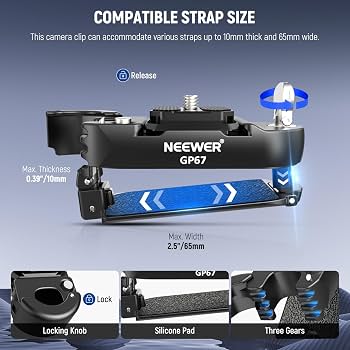
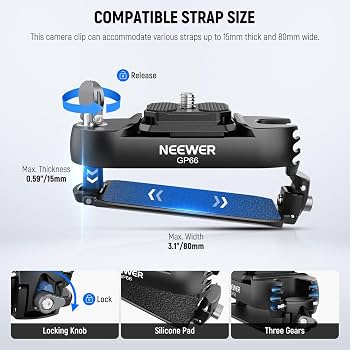
Metal clamp-style systems are commonly used for DSLR and mirrorless cameras. They usually consist of a clamp that grips a strap and a separate camera plate that locks into the clamp.
Aluminum alloy is a common material because it offers a combination of rigidity and relatively low weight. Stainless steel hardware may be used for screws, fasteners, or other components.
The clamp typically tightens around the strap using a screw or similar mechanism. Once installed, the camera plate slides into a receiving channel and engages a locking mechanism.
Peak Design Capture Clip V3 and the Ruggard CCQR-AT are examples of this general approach. Their designs are intended to carry photographic equipment using a dedicated quick-release plate system.
Action Camera Strap Clips
Action camera mounts often use a different interface. Instead of a large camera plate, they may rely on a two-prong GoPro-style connector, a pin, a buckle, or a compact adapter.
These designs can be smaller and lighter than a full-size camera clamp. They are particularly relevant to users carrying a GoPro, DJI action camera, or compatible phone adapter.
Some action camera strap mounts include a rotating joint. That can help point the camera forward, downward, or toward the user. However, rotation is only useful when the joint holds its position securely under the movement expected during use.
Magnetic Quick-Release Designs
Magnetic systems use a compatible adapter to connect the camera or camera holder to the carrying clip. The magnetic connection can make attachment and removal convenient, but the exact locking design is important.
A magnetic mount should not be treated as automatically safe simply because it feels strong when stationary. Users should understand the release method, confirm that any mechanical safety features are engaged, and check that the adapter is designed for the device being carried.
Materials and Contact Surfaces
Different materials bring different trade-offs. Metal construction can provide a solid feel and good rigidity, while reinforced polymers can reduce weight and cost. Rubber or silicone contact surfaces can improve grip and help protect the fabric of a backpack strap.
For a product that spends hours attached to a bag, the surfaces touching the strap deserve attention. Sharp edges, exposed fasteners, or inadequate padding could damage fabric over time. A well-fitted clamp should hold securely without unnecessarily crushing or abrading the strap.
Key Features to Check Before Buying a Camera Capture Clip Mount
A capture clip may look like a small accessory, but a few details determine whether it will work with your equipment. The most important considerations are strap compatibility, camera interface, weight, locking mechanism, and adjustment options.
1. Strap Width and Thickness
Not every backpack strap is compatible with every clip. Some clamps are designed for relatively narrow straps, while others can accommodate wider shoulder straps or belts.
Thickness matters just as much as width. A thick, padded strap may not fit inside a clamp even if it is narrow enough. Before buying, measure the area where you plan to mount the clip and compare it with the manufacturer’s specifications.
Do not assume that a clip will fit every backpack just because it is advertised as a backpack mount. Different bags use different strap shapes, padding, and materials.
2. Camera and Adapter Compatibility
Check the attachment standard before choosing a mount. A photographic clip may use an Arca-style plate, while an action camera may require a GoPro-style connector or a dedicated adapter.
Smartphones usually need an additional phone clamp or cage. If you plan to carry a phone with a microphone or light, check whether the complete setup is supported and whether the additional accessories interfere with the clip.
3. Weight Capacity
The stated load capacity is an important specification, but it should not be the only safety consideration. The complete carried setup includes the camera, lens, plate, adapter, and any attached accessories.
For example, a camera with a large zoom lens may place different forces on a mount than a small action camera, even if both are below a stated weight limit. Walking, bending, cycling, or running can introduce movement that is not represented by a simple static load figure.
Use the manufacturer’s instructions, stay within the rated limits, and avoid assuming that a very high advertised capacity means every configuration is appropriate.
4. Quick-Release Locking System
A quick-release mechanism should make it easy to remove the camera while preventing unintended release. Look for clear engagement, a locking button or latch, and any secondary safety feature included by the manufacturer.
After attaching the camera, check that the plate is fully seated and that the locking mechanism is engaged. A partial connection can look secure without actually being locked.
5. Rotation and Tilt Adjustment
Some action camera mounts offer 360-degree rotation or a pivoting joint. This can be helpful when you want to change the direction of a camera without repositioning the entire clip.
However, a rotating joint needs enough holding force to maintain the selected angle. A loose pivot may allow the camera to droop while walking, changing the framing of your footage.
If you intend to film while moving, prioritize a joint that can be securely tightened or locked rather than choosing solely by the number of adjustment angles.
6. Padding and Anti-Slip Features
Rubberized surfaces can increase friction between the clip and the strap. Padding may also reduce the chance of metal parts rubbing directly against fabric.
Check whether the mount has grip material on both contact surfaces and whether the clamp can be tightened evenly. A clip that shifts around on the strap can be frustrating, even if the camera itself remains attached.
7. Accessory Mounting and Cable Routing
Smartphone rigs and some camera adapters include cold-shoe mounts or 1/4-inch threads for accessories. These can be useful for adding a microphone, light, or compatible support.
Extra mounting points do not automatically mean the entire setup is safe to carry. The total weight, balance, cable routing, and clearance around the release mechanism should all be considered.
Camera Capture Clip Mount: Key Specifications Table
The following table summarizes the specifications and design considerations reported in the supplied research. Figures should be checked against the current product listing and the exact model revision before purchase.
| Specification | What to Check |
|---|---|
| Mounting location | Backpack shoulder strap, chest strap, belt, or another supported attachment point. |
| Camera interface | Arca-style quick-release plate, 1/4-inch camera screw, GoPro-style connector, or dedicated adapter. |
| Strap dimensions | Maximum supported strap width and thickness; verify against the actual bag. |
| Construction | Aluminum alloy, stainless steel hardware, reinforced polymer, rubber, or silicone components. |
| Load rating | Manufacturer’s stated capacity, including any restrictions on camera orientation or movement. |
| Release mechanism | Sliding plate, button lock, latch, retaining pin, buckle, or magnetic adapter with safety features. |
| Adjustment | Fixed angle, pivot, swivel, or multi-axis joint; check whether the position can be locked. |
| Strap protection | Rubber or silicone padding, anti-slip surfaces, and smooth edges. |
| Accessories | Compatible phone holder, cold shoe, tripod thread, action camera adapter, or cable management. |
| Maintenance | Cleaning requirements, replacement parts, locking surface inspection, and manufacturer support. |
How to Install a Camera Capture Clip Mount
Most capture clip systems are straightforward to install, but it is worth taking a few minutes to get the setup right. The clip should be compatible with the strap, the camera plate should be correctly attached, and the locking mechanism should be fully engaged before you carry the camera.
Step 1: Choose the Mounting Strap
Start by deciding where the camera will sit. A backpack shoulder strap is a common choice because it keeps the camera near the chest and within reach.
Check the strap’s width, thickness, padding, and condition. Avoid attaching a heavy camera to a damaged or unsuitable strap. Make sure the selected position does not interfere with backpack adjustment, buckles, or other equipment.
Step 2: Attach and Tighten the Clip
Follow the manufacturer’s instructions for opening and positioning the clamp. If it uses a screw-down mechanism, tighten it securely without forcing the screw beyond its intended range.
Make sure any rubber or protective padding is in contact with the strap as intended. The clip should not wobble, slide, or visibly deform the strap.
Step 3: Attach the Camera Plate
If the system uses a camera plate, attach it to the camera’s tripod socket using the supplied screw. Check the plate’s orientation and any anti-rotation features.
Use the manufacturer’s recommended tightening method. The plate should sit flush and should not rotate freely on the camera body.
Step 4: Insert and Lock the Camera
Slide or click the plate into the receiving clip according to the product instructions. Listen or feel for the locking mechanism engaging, then confirm that any secondary lock is activated.
Do not rely only on the sound of a click. Visually inspect the connection and gently check the camera while supporting its weight.
Step 5: Test the Complete Setup
Before heading out, test the assembled mount with the actual camera and lens. Keep a hand on the camera while checking for movement, unwanted rotation, or strap slippage.
Start with gentle movements in a safe location. If the camera shifts, the clip loosens, or the joint changes angle unexpectedly, stop and correct the problem before using it outdoors.
Real-World Use: Why a Backpack Camera Mount Can Be Convenient
The practical appeal of a camera capture clip mount becomes clearer when you think about how people actually move while taking photos and videos.
Imagine walking through a busy street, exploring a new destination, or following a trail. There may be interesting details around every corner, but stopping to retrieve a camera from a backpack can interrupt the moment.
A clip mount keeps the camera close enough to reach quickly. You can release it, take the shot, and return it to the carrying position without removing your backpack.
Travel and Everyday Photography
For travel photography, quick access can be useful when moving between locations or capturing spontaneous scenes. A camera mounted on a shoulder strap is easier to reach than one packed beneath clothing or other gear.
However, a camera exposed on the outside of a bag is also more visible and may be vulnerable to bumps, snags, weather, or unwanted attention. A clip mount does not replace a padded camera bag or protective cover.
For everyday carry, the convenience depends on how often you actually use the camera. If you take photographs frequently throughout the day, keeping it accessible may be worthwhile. If you only take it out once or twice, a conventional bag may be just as practical.
Hiking and Outdoor Adventures
Hikers often want their hands free while keeping a camera available for landscapes, wildlife, and changing conditions. A backpack camera clip can provide a convenient carrying position without requiring the camera to hang from the neck.
Still, outdoor use places additional demands on the mount. Dust, rain, vibration, changing temperatures, and repeated movement can affect both the clip and the camera strap.
For activities involving climbing, running, cycling, or sudden movement, check whether the specific product is intended for that level of activity. Use a backup tether when appropriate, particularly when carrying expensive equipment over hard or uneven ground.
Vlogging and Content Creation
For vloggers, a capture clip can help keep a camera ready between recording segments. It can also provide a place to carry an action camera when it is not actively being used.
That convenience can be helpful during travel videos, product outings, and behind-the-scenes recording. A smartphone setup may also work if the mount is compatible with the phone holder and the total assembly remains within the manufacturer’s limits.
However, carrying a camera and recording from a strap are two different things. A clip designed for carrying a camera does not necessarily provide a stable filming platform. If you plan to record while walking, consider whether the mount’s pivot, stabilization, and attachment method are intended for that use.
Using a Camera Capture Clip Mount With Different Devices
DSLR and Mirrorless Cameras
Metal clamp-style systems are commonly used with DSLR and mirrorless cameras. Their quick-release plates can make it convenient to move a camera between a strap mount and compatible tripod equipment.
The camera and lens combination matters. A compact prime lens creates a different carrying profile from a large telephoto lens. Check the complete setup rather than relying on the camera body’s weight alone.
Also consider where the camera’s center of gravity sits. A large lens may extend outward or rotate the camera in a way that affects comfort and clearance.
Action Cameras
Action cameras are often well suited to compact strap clips because they are relatively small and may use standardized mounting interfaces.
Compatibility still needs to be checked. Not every mount advertised for an action camera supports every brand, adapter, or protective case. Confirm the connector type and make sure the retaining pin or latch is properly secured.
Smartphones
A smartphone can be carried using a compatible phone clamp or cage attached to a suitable clip system. This may appeal to creators who use a phone as their main camera.
Check the phone holder’s grip, device dimensions, and orientation. If you attach a microphone, light, or cable, make sure the additional equipment does not obstruct the release mechanism or make the assembly awkward to carry.
For filming, remember that the phone’s camera position and stabilization behavior may differ from those of an action camera. A carrying clip is primarily a transport accessory unless the manufacturer specifically supports filming from that position.
Camera Capture Clip Mount Comparison Table
The following comparison covers the models named in the supplied research. Product details, availability, compatibility, and prices can change. Confirm the current specifications and included accessories before purchasing.
| Model | Design | Reported Features | Considerations |
|---|---|---|---|
| Peak Design Capture Clip V3 | Metal clamp with quick-release plate | Aluminum construction, Arca-style plate compatibility, locking mechanism, strap attachment. | Premium-priced; confirm plate compatibility, strap fit, and locking condition. |
| Ruggard CCQR-AT | Metal clamp with quick-release plate | Aluminum construction and a plate-based camera attachment system. | Check the supported strap thickness and current product documentation. |
| PGYTECH Action Cam Strap Holder | Action camera strap mount | Reported rubber-coated contact surfaces, quick-release pin, and rotating adjustment. | Confirm compatible action camera interface and whether the pivot locks securely. |
| STARTRC Magnetic Clip Mount | Magnetic adapter-based clip | Reported magnetic attachment, strap compatibility, and rotational adjustment. | Check the exact adapter and release procedure; verify rated load and intended activities. |
| STUNTMAN Pack Mount | Action camera pack mount | Reported strap anchors, adjustable positioning, and an elastomer support surface. | May be bulkier than compact clips; verify the specific configuration and accessories. |
| Ulanzi Go-Quick II Backpack Clip | Quick-release backpack clip system | Reported phone-holder and action-camera adapter options, depending on kit. | Check exactly what is included and whether the complete assembly suits your device. |
| Generic and budget clips | Varies by manufacturer | Often offer basic strap attachment and camera or action-camera adapters. | Inspect material quality, locking reliability, strap fit, and support information carefully. |
Which Type Fits Your Setup?
If you carry a DSLR or mirrorless camera, a metal plate-based system may be worth investigating. If your camera is a small action camera, a dedicated action camera strap mount may be more compact.
For smartphone creators, compatibility with the phone holder is just as important as compatibility with the backpack clip. Check the complete kit, including any adapter required to connect the phone holder to the mount.
There is no single design that automatically suits every camera, backpack, and activity. The right fit depends on the equipment you carry and how you intend to use it.
Pros and Cons of a Camera Capture Clip Mount
A capture clip can solve a real carrying problem, but it is still an accessory with limitations. Understanding both sides makes it easier to decide whether it belongs in your camera kit.
| Pros | Cons |
|---|---|
| Provides quick access to a camera. | Adds weight and bulk to a strap or belt. |
| Can reduce swinging compared with a loose neck strap. | May not fit every strap width or thickness. |
| Keeps hands free while carrying equipment. | Exposed cameras may be vulnerable to bumps and weather. |
| Some systems allow fast transitions between carrying and shooting. | Quick-release systems require correct engagement and inspection. |
| Different designs support cameras, action cameras, or phones. | Adapters may be required and can add complexity. |
| Some models offer adjustable camera positioning. | Loose pivots can allow unwanted movement or drooping. |
The Convenience Versus Security Trade-Off
The central trade-off is convenience versus the need to keep the camera secure. A quick-release mount makes it easier to access the camera, but that convenience depends on the locking system being used correctly.
Any system carrying expensive equipment should be checked regularly. A backup tether may offer additional protection if the camera’s mounting system supports one and the tether is attached according to its instructions.
Do not use a capture clip beyond its stated capacity or in activities for which it is not designed. A mount that works well during a relaxed walk may not be suitable for fast movement or rough terrain.
Common User Feedback and Issues to Look For
The supplied research describes several themes reported in discussions and retailer feedback about different capture clip designs. These observations should be understood as model-specific reports rather than proof that every unit has the same issue.
Quick-Release Wear
Some users have raised concerns about release behavior after extended use. A locking surface that becomes worn, damaged, or contaminated may not behave as it did when new.
Inspect the plate and receiving channel for damage, and follow the manufacturer’s maintenance and replacement guidance. If the plate does not lock reliably, stop using the mount until the issue is resolved.
Loose Rotating Joints
Some rotating action camera mounts have been criticized for allowing the camera to droop while walking. This is especially relevant when the mount relies on friction rather than a dedicated lock.
If the angle changes during ordinary movement, check the adjustment mechanism and the manufacturer’s instructions. Do not rely on improvised modifications that could weaken the joint or interfere with its safety features.
Strap Fit Problems
A clip may be secure on one backpack but unsuitable for another. Thick padding, tapered straps, unusual stitching, and slippery fabrics can all affect fit.
Check the manufacturer’s dimensions and test the mount on the actual strap before carrying expensive equipment. If the clamp cannot be installed as instructed, choose a compatible alternative.
Small Parts and Retaining Pins
Some action camera mounts use small pins or fasteners that can be misplaced. Keep spare parts organized and check that the correct pin is installed before use.
A missing or incorrect retaining component can compromise the connection. Do not substitute an improvised pin unless the manufacturer explicitly approves it.
Maintenance and Troubleshooting
A capture clip is a mechanical accessory, so routine inspection is part of using it responsibly. A quick check before heading out can help identify dirt, loose fasteners, or visible wear.
Camera Plate Does Not Lock
- Remove the camera while supporting its weight.
- Check that the plate is the correct model and is oriented properly.
- Inspect the receiving channel for grit, damage, or obstruction.
- Reinstall the plate according to the manufacturer’s instructions.
- Do not carry the camera if the locking mechanism does not engage reliably.
The Clip Moves on the Backpack Strap
- Confirm that the strap is within the supported width and thickness range.
- Check that the clamp is installed in the correct orientation.
- Inspect the strap and contact pads for dirt, moisture, or wear.
- Tighten the clamp only as instructed by the manufacturer.
- Choose another mounting location or compatible clip if the strap remains unstable.
The Camera Angle Keeps Changing
- Check whether the mount has a dedicated locking joint.
- Inspect adjustment screws and pivot components for looseness.
- Confirm that the camera and adapter are within the intended load limits.
- Reposition the camera if its weight is pulling the joint off angle.
- Stop using the joint if it is damaged or cannot hold its position.
Cleaning and Storage
Remove dust and grit with a soft, dry cloth and follow the manufacturer’s cleaning guidance. Avoid applying lubricants or chemicals unless they are specifically recommended for the mechanism.
Store small plates, pins, and adapters where they will not be lost. When the mount is not in use, keep it away from conditions that could damage the materials or locking components.
Is a Camera Capture Clip Mount Worth It for Vlogging?
For a creator who frequently switches between walking, talking, filming, and carrying equipment, a camera capture clip mount can be a useful part of the kit.
The biggest benefit is not a new camera feature or a dramatic change in image quality. It is the way the accessory changes how you carry your camera. Instead of putting it away every time you stop recording, you can keep it accessible while moving between moments.
That can be especially convenient for travel vloggers, outdoor creators, and anyone who uses a camera throughout the day. However, the mount needs to match the camera, strap, and activity. A small action camera and a heavy mirrorless camera with a long lens create very different demands.
If you mostly record from a tripod or use a camera only occasionally, the benefit may be less significant. A regular strap or padded camera bag may already suit your routine.
Buying Guide: How to Choose the Right Camera Capture Clip Mount
Before choosing a particular model, work through the following checklist. It is a simple way to avoid buying a mount that looks convenient but does not fit your equipment.
Check Your Camera and Lens Together
Write down the weight and dimensions of your complete camera setup. Include the lens, plate, protective case, phone clamp, or any other equipment that will remain attached while carrying it.
Compare the complete setup with the manufacturer’s specifications and intended use. If the manufacturer does not provide enough information to determine compatibility, seek clarification before purchasing.
Measure the Strap
Measure the width and thickness of the exact section of the strap where the clip will sit. Do not measure only the narrowest part of the backpack strap if the mount will be installed on a wider padded section.
Consider whether the strap changes thickness as it curves around your shoulder. A clip that fits on a flat surface may feel different when installed on a curved or padded strap.
Choose the Right Quick-Release Interface
If you already use a tripod plate system, check whether the capture clip supports that plate. Compatibility can make it easier to move between carrying and tripod use.
If you use an action camera, check the connector type and included adapter. If you use a smartphone, make sure the phone clamp is compatible with the device and the clip.
Consider Comfort and Camera Position
A clip that is technically compatible may still be uncomfortable. Think about where the camera will rest, whether it will hit your arm, and whether it will interfere with backpack straps or other equipment.
Try the position with the backpack loaded as you normally carry it. Check that the camera does not obstruct movement or create an uncomfortable pressure point.
Compare Price With Included Accessories
Two products with similar prices may include different plates, adapters, straps, or safety accessories. Compare the complete package rather than looking only at the headline price.
Also consider replacement parts, warranty terms, and whether the manufacturer provides clear instructions. A lower-cost mount may be suitable for a lightweight camera, while another setup may require a more specialized product.
Quick Buying Checklist
- Does the mount support your camera and lens combination?
- Does it fit the width and thickness of your actual backpack strap?
- Is the camera interface compatible with your plate or adapter?
- Is the stated load capacity appropriate for your complete setup?
- Does the release mechanism have clear locking instructions?
- Can the camera angle be adjusted and held securely?
- Are the strap contact surfaces suitable for your backpack?
- Are replacement parts and support information available?
- Does the complete kit fit your budget?
Camera Capture Clip Mount vs. Traditional Camera Strap
A capture clip and a traditional camera strap solve related but different carrying problems. Neither is automatically the right option for every photographer.
A neck or shoulder strap is simple and familiar. It can be convenient when you want the camera hanging freely and ready to raise to your eye. A capture clip keeps the camera in a more fixed position against a compatible strap or belt.
The clip may reduce swinging, but it can also make the camera less comfortable in certain positions. A traditional strap may be easier to use with a wider range of bags and camera bodies, while a dedicated capture clip can offer a more structured carrying arrangement.
Some photographers use both: a clip for carrying and a separate strap or tether for additional security. Any combined setup should be assembled according to the instructions for each component.
Camera Capture Clip Mount vs. Action Camera Chest Mount
A backpack clip is primarily a carrying solution, while a chest mount is often designed to position an action camera for recording from a first-person perspective.
A chest mount may provide a more deliberate filming angle, but it can require a harness and may be less convenient when you simply want to carry a camera between shots.
A backpack clip can be quicker to install and remove from a compatible strap, but the camera’s position may change with the bag’s movement. Whether it works for recording depends on the mount’s design and the camera’s stabilization capabilities.
Before using either option for action footage, check the manufacturer’s intended use and test the complete setup in a safe environment.
How a Capture Clip Fits Into a TheKZVerse Gear Setup
At TheKZVerse, the fun of exploring gadgets is not just looking at a specification sheet. It is figuring out where a product fits into everyday use and whether it solves a problem you actually have.
A camera capture clip mount is a good example of a small accessory that can change the routine around a larger piece of gear. The camera itself may be the star of a video, but carrying it comfortably can influence how often you reach for it.
If you enjoy exploring practical accessories, browse the TheKZVerse Gadgets category for more gear-related content. You can also explore our Tech Reviews and Unboxings sections for additional product coverage.
For another camera-related topic, you can also watch this related camera and gear video.
Visit the TheKZVerse homepage to explore more reviews, unboxings, gadgets, gaming gear, and everyday finds.
Watch the Camera Capture Clip Mount Episode
Want to see the product featured in the episode? Watch the video below for the original presentation and product context.
If you have used a camera clip on a backpack strap, share your experience in the comments. What camera did you carry, and did the mount make it easier to capture spontaneous moments?
Frequently Asked Questions About Camera Capture Clip Mounts
1. What is a Camera Capture Clip Mount used for?
A camera capture clip mount attaches a camera or compatible camera holder to a backpack strap, belt, or other supported mounting point. It is designed to keep the camera accessible while carrying it hands-free.
2. Can I use a camera capture clip mount with a DSLR?
Some metal clamp-style capture clips are designed for DSLR and mirrorless cameras using a compatible quick-release plate. Check the exact camera and lens weight, plate compatibility, and manufacturer’s instructions before use.
3. Will a camera clip fit any backpack strap?
No. Each mount has its own supported strap width and thickness. Measure the intended mounting area and compare it with the product specifications before buying.
4. Can I mount a GoPro or other action camera?
Some capture clips are designed for action cameras and use a GoPro-style connector, pin, or dedicated adapter. Confirm that your exact camera and adapter are supported by the mount.
5. Can I use a capture clip mount for smartphone vlogging?
Potentially, if the clip supports a compatible smartphone holder or cage. Check the complete assembly, including the phone’s dimensions, accessories, total weight, and whether the mount is intended for carrying or recording.
6. Are magnetic camera clip mounts secure?
Security depends on the particular product, adapter, locking design, and intended use. Follow the manufacturer’s instructions, engage all safety features, and test the complete setup before carrying expensive equipment.
7. Is a camera capture clip better than a neck strap?
They offer different carrying experiences. A clip can keep a camera in a fixed position against a strap or belt, while a neck strap allows the camera to hang more freely. The suitable option depends on comfort, camera size, and how you shoot.
8. How do I maintain a camera capture clip mount?
Inspect the clip, camera plate, screws, locking surfaces, and backpack strap regularly. Keep the mechanism clean, follow the manufacturer’s maintenance instructions, and stop using the mount if it shows damage or unreliable locking.
Final Verdict: Is a Camera Capture Clip Mount Worth Considering?
The Camera Capture Clip Mount addresses a straightforward problem: keeping your camera accessible while carrying it. Instead of constantly reaching into a backpack or letting a camera swing from a neck strap, you can attach it to a compatible strap or belt and keep it close at hand.
That makes the concept appealing for travel photographers, vloggers, hikers, and content creators who regularly move between carrying and shooting. The right design can offer quick access, a more controlled carrying position, and convenient transitions between moments.
But compatibility and safety matter. Strap dimensions, camera weight, plate or adapter standards, release locks, and adjustment joints all deserve attention. A capture clip is only as useful as the fit between the mount, your equipment, and the way you plan to use it.
For lightweight action cameras, a compact strap holder may be enough. For heavier photographic equipment, a purpose-built metal clamp and compatible plate may be more appropriate. Smartphone creators should check the phone holder and complete accessory setup rather than assuming every clip will work with every phone.
My takeaway: A camera capture clip mount is worth considering if quick access is a regular part of your photography routine. It is a practical carrying accessory, not a substitute for checking your gear or using the correct safety precautions.
If the idea of keeping your camera ready instead of buried in your bag sounds useful, watch the episode, compare the mount’s specifications with your setup, and make sure the exact model suits your needs before buying.
Ready to check the product? Add the verified product or affiliate URL below before publishing. No purchase link was included in the supplied material.
Check Camera Capture Clip Mount
Purchase link placeholder: replace this destination with the verified product or affiliate URL before publication.
Follow TheKZVerse
Enjoyed this camera gear guide? Subscribe, share your thoughts in the comments, and follow TheKZVerse for more unboxings, hands-on reviews, tech gadgets, gaming gear, and interesting everyday finds.
- Follow TheKZVerse on Instagram
- Follow TheKZVerse on Facebook
- Subscribe to TheKZVerse on YouTube
- Follow TheKZVerse on TikTok
- Join TheKZVerse on Threads
Have you tried a backpack camera clip? Let us know what worked, what did not, and which camera you use. Your experience could help another creator find the right carrying setup.
Subscribe to our email newsletter to get the latest posts delivered right to your email.
Comments