Category: Tech Reviews | Gadgets | Deep Dive & Hands-On
iPhone Pencil in 2026: Apple Pencil on iPhone Duo Tested + Best Stylus for Any iPhone
Apple finally broke its nearly twenty-year stylus rule with iOS 27.2 on the foldable iPhone Duo—here is the complete truth about the iPhone Pencil, what actually works, what got scrapped behind closed doors, and the best alternatives for every standard iPhone.
If you searched the web for an iPhone Pencil in late 2026, you probably walked away scratching your head. On one side of the tech internet, headlines insist that Apple still refuses to let a stylus anywhere near its smartphones. On the other side, video clips show an official white Apple Pencil sketching directly across an iPhone screen in Procreate Pocket and Apple Notes. Surprisingly, both sides of that story carry a kernel of truth.
As of November 2026, there is still no standalone Apple accessory officially branded or sold as an “iPhone Pencil.” Every traditional slab smartphone in Apple’s lineup—including the iPhone 16, iPhone 17, iPhone 17e, iPhone 17 Pro, iPhone Air, and iPhone 18 Pro—remains completely incompatible with every official Apple Pencil on store shelves. Yet in late October 2026, Apple quietly shattered a nearly two-decade taboo when it released iOS 27.2, activating official Apple Pencil support on its book-style foldable, the iPhone Duo.
Before you rush out and drop $79 or $129 on a stylus expecting an iPad Pro experience in your pocket, there are major caveats you need to know. Only one model in Apple’s entire stylus family—the budget-focused Apple Pencil (USB-C)—works on the iPhone Duo. Meanwhile, the flagship $129 Apple Pencil Pro and the 2nd-generation Apple Pencil are completely locked out. Even on the foldable Duo, you lose pressure sensitivity, wireless pairing, and magnetic storage, largely because Apple developed and subsequently shelved a bespoke, shorter magnetic stylus after hitting pre-production technical snags.
Whether you already own an iPhone Duo and want to know how the iPhone Pencil workflow actually holds up in day-to-day testing, or you carry a standard slab iPhone and need a reliable third-party stylus for handwritten notes, PDF signatures, or digital illustration, we have tested and researched the entire landscape. Welcome back to TheKZVerse—let’s unpack the real story behind Apple’s smartphone stylus pivot, examine inner-screen durability, and find the right pen for your setup.
The Story Behind the iPhone Pencil: From Shelved Hardware to iOS 27.2
To understand why Apple’s first official smartphone stylus rollout looks so unconventional—and frankly a little improvised—you have to look at both recent supply-chain reporting and nearly twenty years of Cupertino history. When Steve Jobs stepped onto the stage to unveil the original iPhone in 2007, he famously mocked the plastic resistive-screen styluses of that era: “Who wants a stylus? You have to get them and put them away, and you lose them.” Even after Apple introduced the original Apple Pencil alongside the iPad Pro in 2015 and steadily expanded stylus support across the iPad Air, entry-level iPad, and iPad mini, the iPhone remained strictly a finger-first device.
Behind that product philosophy sat a very real hardware barrier. As hardware engineers and technical commentators on forums like Hacker News have pointed out for years, an Apple Pencil does not work like a basic stylus mimicking a fingertip on standard capacitive glass. Much like Samsung’s S Pen ecosystem, Apple Pencil requires an active digitizer layer embedded directly beneath the display glass to register precision tilt, hover coordinates, sub-millimeter accuracy, and palm rejection. Standard non-folding iPhones simply lack that underlying digitizer hardware. Industry observers have also noted that omitting Pencil support from Pro Max iPhones helped Apple preserve clean product separation between its largest smartphones and the iPad mini.
Why a Foldable Changed Apple’s Stance
Once Apple committed to building a book-style foldable smartphone, that entire equation changed. Rumors suggesting an Apple foldable would support a stylus first surfaced as early as February 2021 via GSMArena, and debate intensified across MacRumors forums and Reddit throughout 2025 and 2026 as enthusiasts wondered whether a razor-thin folding chassis could fit a digitizer without sacrificing pocketability. When a pocket-sized handset unfolds into an expansive 7.6-inch inner canvas approaching iPad mini territory, stylus input stops feeling gimmicky and starts acting as a legitimate productivity weapon against rivals like Samsung’s Galaxy Z Fold lineup. If you love tracking how foldable hardware is evolving, you can browse more deep dives in our Foldable Phones archive.
The Scrapped Magnetic “iPhone Pencil” Hardware
According to September 2026 supply-chain reports from 9to5Mac, MacRumors, and BigGo Finance, Apple originally planned to meet this moment with custom-built hardware: a shorter, magnetic iPhone Pencil (linked in early leaks to the foldable “iPhone Ultra” or iPhone Duo) engineered specifically to snap onto the hinge side of the folding chassis. Before mass production ramped up, however, that compact stylus hit unspecified “technical problems,” forcing Apple to shelve the accessory and pivot to supporting the existing, full-length Apple Pencil (USB-C) instead. As 9to5Mac highlighted, it remains unclear whether those pre-production issues stemmed from internal component flaws inside the shorter stylus or engineering hurdles with wireless magnetic charging on the iPhone Duo’s frame.
“Because Apple’s software engineers had originally built the iPhone Duo’s firmware around a cancelled magnetic accessory, adapting iOS to recognize a standard iPad stylus required fresh system code and heavy internal validation.”
That behind-the-scenes pivot explains why Apple Pencil support was noticeably absent when the iPhone Duo first hit store shelves, with Apple initially promising stylus compatibility before the end of 2026. Fortunately, that update arrived ahead of schedule in late October 2026 as part of iOS 27.2. If the shelved accessory’s technical roadblocks were isolated to the stylus itself rather than the Duo’s charging architecture, 9to5Mac notes that Apple could still revive a shorter, dedicated foldable Pencil in a future cycle.
Future R&D: Optical Surface-Tracking Patents
Looking further out on Apple’s research horizon, patent filings confirm that Cupertino engineers are actively exploring ways to bring stylus input to standard, non-foldable devices without embedding a costly digitizer layer in every screen. Earlier Apple patents from 2018 and April 2024 explored mid-air “magic wand” spatial drawing and battery-free stylus designs. More recently, in July 2025, PhoneArena and MacRumors uncovered a newly granted Apple patent describing a next-generation Apple Pencil packed with integrated optical and motion sensors. By tracking movement directly across a physical wooden desk or nearby tabletop and beaming positional coordinates wirelessly, such a stylus could theoretically work with any standard iPhone, MacBook Pro, or even an Apple Watch. Still, both publications emphasize that Apple patents frequently depict broad illustrative scenarios and represent exploratory R&D rather than confirmed retail products. For buyers in late 2026, official iPhone Pencil support begins and ends with the iPhone Duo.
Official iPhone Pencil Compatibility Across iPhone and iPad Models
One of the most common questions we see from readers and YouTube viewers is straightforward: “I already own an Apple Pencil for my iPad—will it work on my iPhone?” If you carry any non-folding smartphone—including the iPhone 16, iPhone 17, iPhone 17e, iPhone 17 Pro, iPhone Air, or iPhone 18 Pro—the answer is an uncompromising no.
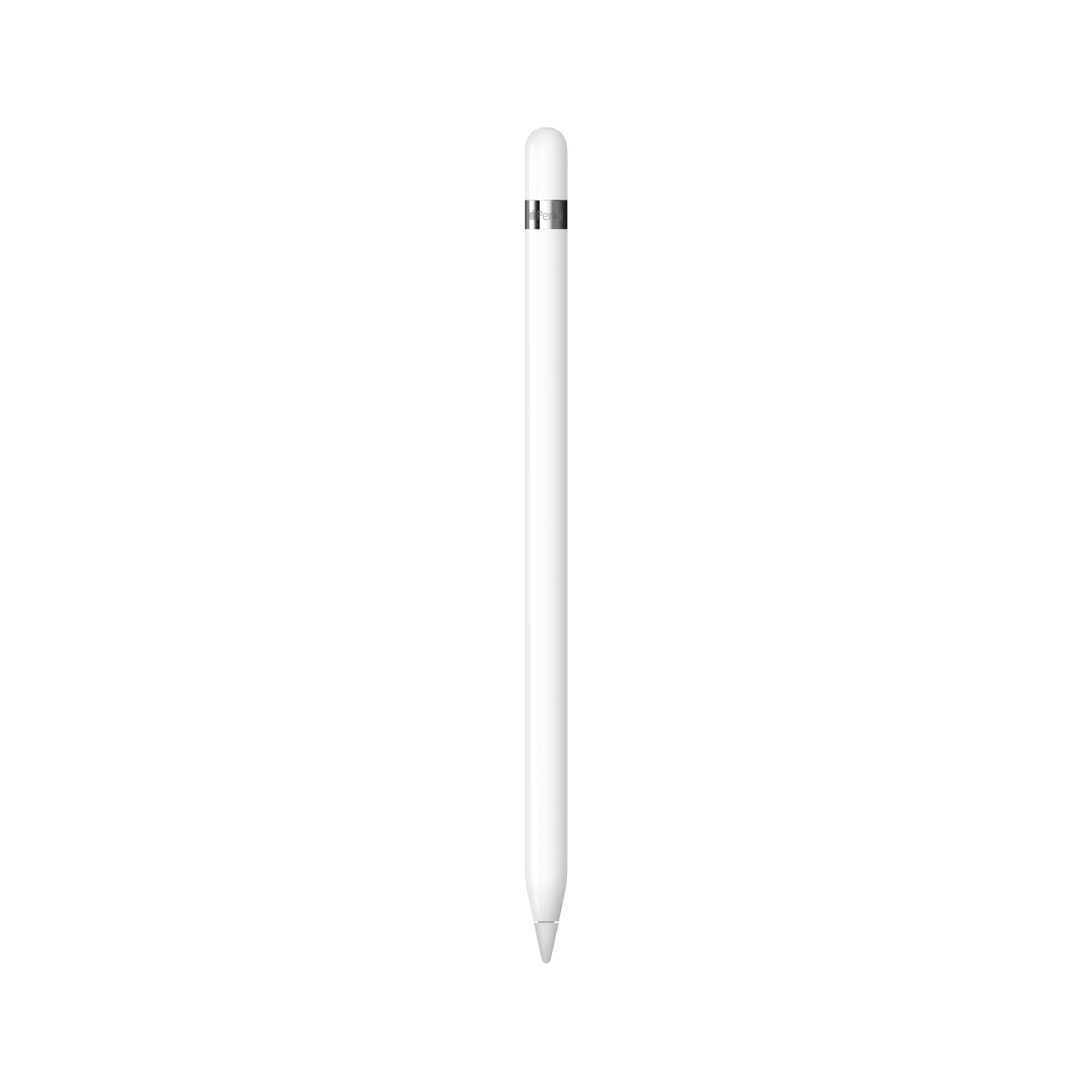
Even if you own the foldable iPhone Duo, compatibility is restricted to a single SKU. According to Apple’s official support documentation updated on November 5, 2026, only the Apple Pencil (USB-C) is compatible with the iPhone Duo, and the phone must be running iOS 27.2 or later. Neither the $129 Apple Pencil Pro, the $129 Apple Pencil (2nd generation), nor the original Apple Pencil (1st generation) can pair with or register input on the iPhone Duo.
Furthermore, hands-on testing by AppleInsider and owner reports across Reddit’s r/iPhoneDuo community confirm that popular third-party active styluses built around Apple’s iPad Pencil protocol—including the Logitech Crayon (USB-C), ESR digital pencils, and the Metapen A8—do not work on the iPhone Duo under iOS 27.2. Despite misleading compatibility badges on several third-party Amazon product listings, Apple has locked iOS 27.2 stylus authentication strictly to its own USB-C Pencil.
| Apple Pencil Model | Retail Pricing | Pairing & Charging Method | Pressure Sensitivity | Key Features | iPhone Duo Support (iOS 27.2+) | Standard iPhone Support |
|---|---|---|---|---|---|---|
| Apple Pencil (USB-C, 2023) | $79 MSRP ($69 on sale) | Wired USB-C cable under sliding cap | No | Tilt sensitivity; hover supported on select iPads | Yes | No |
| Apple Pencil Pro (2024) | $129 MSRP ($99 on sale) | Magnetic wireless attachment on supported iPads | Yes | Squeeze, barrel roll, haptics, double-tap, hover, Find My | No | No |
| Apple Pencil (2nd Gen, 2018) | $129 MSRP | Magnetic wireless attachment on supported iPads | Yes | Double-tap tool switching; hover on select older iPad Pros | No | No |
| Apple Pencil (1st Gen, 2015) | $99 (discontinued; select retail stock) | Lightning connector (or USB-C adapter on iPad 10th gen / A16) | Yes | Tilt sensitivity; round glossy weighted barrel | No | No |
Cross-Device Versatility vs. Pairing Friction
This single-model restriction creates an interesting dynamic for households that own both iPads and foldables. While the Apple Pencil Pro remains the undisputed flagship for iPad illustrators, its exclusive reliance on magnetic wireless pairing and inductive charging—available only on the iPad Pro (M4 and M5), iPad Air (M2, M3, and M4), and iPad mini (A17 Pro and A20 Pro) running iPadOS 17.5 or later—keeps it completely incompatible with the iPhone Duo.
Conversely, the $79 Apple Pencil (USB-C) is Apple’s most versatile cross-device stylus. Alongside the iPhone Duo, it pairs with virtually every USB-C iPad running iPadOS 17.1.1 or later, including:
- Standard iPad: iPad (10th generation) and iPad (A16)
- iPad mini: iPad mini (6th generation), iPad mini (A17 Pro), and iPad mini (A20 Pro)
- iPad Air: iPad Air (4th generation, 5th generation, M2, M3, and M4)
- iPad Pro 11-inch: 1st through 4th generation, plus M4 and M5 models
- iPad Pro 12.9-inch & 13-inch: 12.9-inch (3rd through 6th generation) and 13-inch (M4 and M5)
Even so, sharing a single USB-C Pencil between an iPad and an iPhone Duo introduces mild daily friction. According to Apple’s official pairing guide, the stylus stays linked to the last device it connected with only until you restart that device, toggle Bluetooth off, or physically plug it into another iPad or iPhone Duo. Every time you switch between your tablet and your phone, you need a USB-C cable on hand to re-establish the wired handshake.
Design, Build & Unboxing Impressions: Apple Pencil (USB-C) on iPhone Duo
Physically, unboxing and holding the Apple Pencil (USB-C) feels immediately familiar if you have ever used a modern iPad stylus. It sports a clean matte white barrel, a replaceable plastic nib, and a single flat magnetic edge engineered to stop the pen from rolling off your desk. Apple’s US specifications list its barrel diameter at 0.35 inches, and instead of an exposed Lightning plug or wireless inductive coil, a non-removable sliding cap at the top reveals a standard USB-C port.
On a compatible iPad, that flat edge snaps firmly onto the tablet’s side rail for effortless storage and transport. On the iPhone Duo, however, there is no magnetic mounting rail anywhere on the frame. That omission immediately highlights the stylus’s fallback origins: the full-size Apple Pencil (USB-C) stands at least an inch taller than the folded iPhone Duo, leaving you with nowhere on the phone to clip, snap, or store it when you slip the handset into your pocket. For more hands-on hardware breakdowns like this, explore our Unboxings hub.
How to Pair and Charge Apple Pencil (USB-C) on iPhone Duo
Because magnetic wireless pairing is absent on Apple’s foldable, initializing your iPhone Pencil setup requires a direct wired cable connection. Apple’s official user guide outlines a quick four-step pairing process:
- Expose the port: Slide open the top cap of the Apple Pencil (USB-C) to reveal its recessed USB-C port.
- Connect the cable: Plug one end of the USB-C charge cable included in your iPhone Duo box into the Pencil, and connect the other end to your iPhone Duo’s bottom USB-C port.
- Confirm pairing: Wait a moment for the iOS 27.2 system prompt to appear on screen and tap “Tap to Connect”.
- Unplug or top up: Disconnect the cable once pairing completes, or leave it tethered briefly to charge the stylus battery directly from your phone.
The Deep-Sleep Quirk You Need to Know About
While initial pairing happens almost effortlessly once connected, hands-on testing by AppleInsider uncovered an annoying real-world quirk during extended daily carry: the Apple Pencil (USB-C) periodically enters a deep sleep state and refuses to wake up automatically. Because the stylus has zero physical buttons and tapping its plastic tip against the iPhone Duo’s glass does not rouse it, the only way to wake an unresponsive Pencil when you are out at a coffee shop or in a meeting is to plug it back into the iPhone Duo—or a USB-C power bank—with a cable. That means carrying a short USB-C cable in your pocket or bag is practically mandatory.
Display Experience & Software Performance on iPhone Duo
Once paired and awake, the Apple Pencil (USB-C) works across both of the iPhone Duo’s screens: the compact 5.4-inch outer cover display and the expansive 7.6-inch unfolded inner canvas. In day-to-day testing, reviewers report two very different tactile sensations depending on which screen you write on.
AppleInsider describes the 5.4-inch outer cover display as glossy, rigid, and completely free of flex—behaving much like a miniature iPad for jotting down quick grocery items, phone numbers, or reminders without unfolding the phone. Unfolding the iPhone Duo reveals the 7.6-inch inner display, where reviewer opinions on surface texture diverge slightly: TechRadar’s Lance Ulanoff praises its lightly textured, nano-etched finish for delivering natural drag and pencil-like control compared to slick tablet glass, while AppleInsider notes that the pliable plastic inner layer exhibits noticeable physical “give” beneath the nib.
What Works Great Under iOS 27.2
On the software front, iOS 27.2 delivers a surprisingly polished core stylus toolkit on the iPhone Duo:
- System-Wide Scribble & Navigation: You can navigate menus, launch apps, and scroll web pages with pinpoint precision. System-wide Scribble lets you handwrite URLs straight into Safari’s address bar, fill out standard text boxes naturally, and convert messy cursive into typed text.
- Apple Notes & Math Notes: Handwritten notes in Apple Notes feel crisp and responsive, and you can even write out mathematical equations by hand to trigger automatic instant solving.
- Built-In Productivity Apps: Freeform infinite whiteboards, Apple Journal entries, and PDF or e-book highlighting in Apple Books work right out of the box.
- Creative Apps & Palm Rejection: Mobile illustration apps like Procreate Pocket benefit from near-zero ink latency, accurate tilt shading, stroke-speed detection, and rock-solid palm rejection—letting you rest the side of your hand naturally across the 7.6-inch display without leaving stray marks.
What Is Missing From the iPhone Pencil Experience
Despite responsive ink tracking and dependable palm rejection, using an Apple Pencil on the iPhone Duo strips away almost every pro-tier perk found on modern iPad Air and iPad Pro models. Here is the exact breakdown of what works and what is missing:
| Feature or Capability | Status on iPhone Duo (iOS 27.2+) | Practical Impact for Everyday Users |
|---|---|---|
| Dual-Display Input (Inner & Outer) | Supported | Works seamlessly on both the 5.4-inch cover screen and 7.6-inch unfolded display. |
| Scribble & OS Navigation | Supported | Converts handwriting in Safari and Notes and solves handwritten math equations. |
| Tilt Sensitivity & Low Latency | Supported | Detects barrel tilt angle and stroke speed with near-instant on-screen ink response. |
| Hardware Palm Rejection | Supported | Lets users rest their wrist naturally across the 7.6-inch panel while writing. |
| Pressure Sensitivity | Not Supported | Inherent limitation of the USB-C Pencil; line tapering requires manual brush sizing. |
| Apple Pencil Hover | Not Supported | Although supported on M2/M4 iPads, hover cursor preview is disabled on iPhone Duo. |
| Double-Tap, Squeeze, Barrel Roll, Haptics | Not Supported | Advanced hardware gestures remain exclusive to 2nd Gen and/or Apple Pencil Pro. |
| Find My Tracking Integration | Not Supported | Exclusive to the $129 Apple Pencil Pro. |
| Magnetic Mounting & Wireless Charging | Not Supported | No magnetic rail on the Duo chassis; requires carrying a USB-C cable to charge or wake. |
The lack of pressure sensitivity stems directly from Apple limiting support to the USB-C Pencil, though TechRadar points out that this restriction doubles as a smart hardware safeguard—discouraging users from pressing hard onto a flexible folding display. For digital illustrators, however, it means achieving thick-to-thin line variation requires manually adjusting brush sizes or tapering strokes by speed. Ergonomically, you also run into a classic foldable nuisance: the iPhone Duo’s protruding rear camera bump causes the unfolded phone to rock back and forth on a flat desk unless you steady it with your non-drawing hand.
Real-World Reviewer Verdicts & The Inner-Screen Durability Debate
Professional tech reviewers testing the iPhone Duo and Apple Pencil (USB-C) in November 2026 have landed on sharply divided conclusions—largely depending on whether they treat the combination as a spontaneous pocket sketchbook or a dedicated digital art workstation.
In an enthusiastic hands-on review for TechRadar, veteran digital artist Lance Ulanoff celebrated the pairing as the “perfect doodling duo.” Comparing the foldable to carrying “Mr. Peabody’s expandable chalkboard” in his pocket, Ulanoff noted that any distraction from drawing on a flexible screen faded within minutes, offering a portable canvas remarkably close to an iPad mini. Most impressively, he tested drawing back and forth directly across the central hinge crease: even though your fingers and nib lightly feel the dip of the fold, on-screen lines remained razor-straight without wobbling or jittering. Running Procreate Pocket (since Apple still restricts the full iPad version of Procreate to iPadOS) proved fluid overall, aside from minor UI quirks where toggling between pen and eraser tools occasionally took two taps. Ulanoff’s only real complaint echoed every other tester: having a 7.6-inch drawing pad in his pocket left him frustrated that there was nowhere on the phone to attach the stylus.
By contrast, AppleInsider’s November 17, 2026 assessment took a much cooler stance, calling Apple Pencil support on the iPhone Duo a “bare-minimum experience.” While acknowledging that casual note-takers, PDF signers, and Scribble fans will appreciate basic stylus input, AppleInsider argued that the Duo falls short as a primary drawing machine. Citing the wobbling camera bump on tabletops, the awkward height mismatch between phone and stylus, the lack of magnetic storage, and the need to carry a USB-C cable just to wake a sleeping Pencil, the outlet concluded that Apple truly needs to release a compact, magnetically attached “Apple Pencil mini” engineered specifically for future foldables. For more honest takes on everyday tech ergonomics, check out our Tech Reviews archive.
Will the Apple Pencil Scratch or Damage the iPhone Duo’s Inner Screen?
Beyond ergonomics, one major question dominates threads on Reddit’s r/iPhoneDuo, MacRumors forums, and YouTube durability tests: will a hard plastic Apple Pencil tip scuff, dent, or permanently scratch the iPhone Duo’s flexible 7.6-inch inner screen?
Unlike rigid cover glass, a folding display relies on a softer, pliable polymer top layer that yields slightly under pressure. Immediately after iOS 27.2 rolled out, owners worried that repeated sketching—especially crossing the central fold—would leave permanent grooves. So far, early creator durability tests and daily owner reports indicate manageable wear if you use a gentle touch, though multi-month longevity data does not yet exist. Multiple YouTube testers have specifically examined whether normal writing leaves visible tracks on the inner panel, while daily iPhone Duo Pencil users on Reddit report wiping routine surface smudges away cleanly with an Apple polishing cloth while still taking extra care around the crease.
As CashIt noted in late October 2026, Apple has not published explicit scratch warranties for stylus use or introduced a softer elastomer nib specifically for foldable displays. Adding to owner caution, separate supply-chain controversy erupted in November 2026 (dubbed “Crackgate” online) after Weibo leakers cited by TweakTown and MacRumors alleged that inner-screen cracking along the Duo’s crease on certain units stemmed from defective materials at one of Apple’s two hinge suppliers. Even though hinge-related cracking is separate from stylus tip wear, wiping dust particles off the flexible screen before sketching and keeping a light hand remain essential habits for Duo owners.
Pros & Cons of Using Apple Pencil (USB-C) on iPhone Duo
Before deciding whether to spend $79 on an Apple Pencil (USB-C) for your iPhone Duo, here is a clear look at where the experience shines and where it falls short:
| What We Love (Pros) | What Could Be Better (Cons) |
|---|---|
|
|
Best Third-Party Styluses for Standard iPhones (2026 Buyer’s Guide)
What if you carry a standard slab iPhone—like an iPhone 16, iPhone 17, iPhone 17 Pro, iPhone Air, or iPhone 18 Pro—and still want a great stylus? Because standard iPhones do not have an active Pencil digitizer, and because active iPad clones like the Logitech Crayon, ESR digital pencils, and Metapen A-series styluses rely on Apple’s iPad protocol (failing on both standard iPhones and the iPhone Duo), regular iPhone owners must turn to universal capacitive styluses or specialized app-assisted pens.
Before buying any third-party stylus for a standard iPhone, keep one fundamental rule of physics in mind: standard capacitive styluses mimic the electrical conductivity of a human fingertip. Because the iPhone screen treats the stylus tip just like a finger, native hardware palm rejection is impossible on a standard iPhone. If you rest the heel of your hand on the glass while writing, the screen will register accidental touches unless you hover your wrist or wear a simple non-conductive Lycra two-finger artist glove. Most capacitive pens also lack tilt detection and pressure sensitivity. Choosing the best third-party stylus comes down to picking the right tip style—transparent precision disc, conductive fiber mesh, soft rubber dome, powered fine point, or audio/app-driven pressure nib—for your specific workflow.
1. Adonit Pro 4: Best Passive Precision Disc Stylus
If you want pinpoint accuracy for signing documents, tapping tiny spreadsheet cells, or light sketching without ever worrying about batteries, charging cables, or Bluetooth pairing, the Adonit Pro 4 remains a gold-standard passive pick. Listed at $39.99 MSRP (and frequently discounted to $23.99 on Adonit’s store or roughly EUR 35.67–35.99 in Europe), the Pro 4 features a balanced aluminum barrel measuring 124.7 mm by 9.25 mm and weighing 22 g per Adonit’s official specs, complete with a textured copper twist cap and a grooved pocket clip. At the tip sits a clear, scratch-resistant PET precision disc cushioned to glide smoothly while letting you see the exact pixel where your stroke touches the glass.
Hands-on reviews highlight clear pros and cons. A February 2024 buying guide from MediaPeanut ranked the Adonit Pro 4 as its top overall passive stylus for iPhones, and verified buyers frequently praise its drop-resistant disc durability. Creative Bloq, however, offered a more measured take: awesome for smudge-free web browsing, tapping, and signatures, yet “hit and miss” for long note-taking or drawing sessions because of missing palm rejection, zero pressure sensitivity, and the disc’s tendency to skip strokes if held at an extreme angle. Prospective buyers should also note multiple customer complaints from 2025 and 2026 posted on Adonit’s own storefront citing shipping delays and slow direct customer service—so ordering through established retailers like Amazon’s Adonit Pro 4 listing is a much safer bet than buying direct.
2. Adonit Dash 4: Best Dual-Mode Powered Fine-Point Stylus
If clear plastic discs look distracting to your eye and you prefer a solid, pen-like fine tip that works across both your standard iPhone and an iPad, the Adonit Dash 4 ($59.99 MSRP) bridges both worlds. Weighing just 15 g with a sleek 150 mm by 8.8 mm aluminum-and-plastic body, this portless stylus snaps onto an included magnetic USB-C charging stand, hitting a full charge in one hour for up to 15 hours of continuous use. Clicking the top power button toggles between two LED modes: green mode works universally on all iPhones and Android phones without Bluetooth pairing, while blue mode unlocks native palm rejection exclusively on compatible newer iPads.
In a November 2021 hands-on review for G Style Magazine, the Dash 4 earned high praise for its lightweight balance, magnetic charging dock, and crisp accuracy when jotting quick memos or signing PDFs. Its main limitation surfaced during fine-art line tests: straight horizontal and vertical lines tracked cleanly, while slow diagonal strokes showed slight waviness (observed during universal-mode testing on a Galaxy S21 Ultra). Remember that in green universal mode on an iPhone, palm rejection is not active, and Adonit’s direct store reviews for the Dash 4 carry similar 2025 shipping-delay complaints alongside positive hardware ratings.
3. MEKO 2-in-1 and 3-in-1 Universal Styluses: Best Budget Precision Value
For families, students, or travelers who want dependable styluses stashed in every bag without paying $40 apiece, MEKO’s 2-in-1 and 3-in-1 Universal Stylus kits remain perennial Amazon bestsellers, typically priced between $18 and $26.99 for multi-pack bundles loaded with spare replacement tips. According to a hands-on review from TechBuzzIreland, the 2nd-generation MEKO 2-in-1 Precision Series measures 5.5 inches (140 mm) long with a 0.35-inch (9 mm) aluminum-and-stainless-steel barrel weighing 24 g, pairing a 6.8 mm transparent precision disc under a screw cap on one end with a 6 mm conductive wire-mesh fiber tip on the other.
Reviews from ParkaBlogs and TechBuzzIreland applauded MEKO’s strong price-to-performance ratio: digital ink aligns dead-center beneath the clear disc for neat handwriting, while the durable wire-mesh tip glides smoothly across OLED glass with far less drag than cheap rubber nubs during everyday scrolling. Long-term owner feedback on ParkaBlogs notes two practical quirks: the screw-on grip section can loosen after months of pocket carry, and threading tiny replacement rubber connectors into the tip holder takes patience. Like other passive capacitive pens, MEKO styluses lack palm rejection and pressure sensitivity, making them ideal everyday utility pens rather than pro art tools. You can browse current multi-pack bundles via MEKO Universal Stylus bundles on Amazon.
4. SonarPen: Best Affordable Pressure-Sensitive Stylus for Digital Art
Digital artists illustrating in Procreate Pocket on a standard iPhone face a surprisingly slim market if they want genuine thick-to-thin brush dynamics without buying an iPad. Priced around $35 on Amazon, the SonarPen stands out as a rare budget gem. Highlighted by ZDNet for its broad cross-platform support across iOS, Android, Chromebook, Windows, and Nintendo Switch, SonarPen is frequently recommended across Reddit’s r/ProCreate and r/DigitalPainting communities because it delivers true pressure sensitivity inside supported iOS drawing apps like Procreate Pocket. Because it relies on app-level integration and lacks built-in iPhone hardware palm rejection (pairing best with an artist glove), it caters to dedicated mobile illustrators rather than casual note-takers—but virtually no competing sub-$50 iPhone stylus matches its expressive line control.
5. Yunju 10-Pack and Metapen Universal: Best Ultra-Cheap Finger Replacements
Not everyone searching for an iPhone Pencil wants to sketch illustrations or handwrite long journal entries; many people simply want to keep fingerprints off their screen, navigate their phone while wearing winter gloves, or help older family members who find fingertip gestures frustrating. In a 2026 TechRadar roundup of budget styluses, the Yunju Stylus Pen 10-pack (GBP 3.99 to GBP 4.49 in the UK, or roughly 40 pence per pen) impressed testers despite having zero Bluetooth, batteries, or buttons. Its soft silicone rubber tips behave just like a fingertip across phones and tablets, making them cheap enough to keep in every jacket pocket or kitchen drawer, even though rubber tips create slightly more glass friction and wear faster than woven fiber mesh. For a sturdier ergonomic alternative, the Metapen Universal Stylus Pen ($16.99 at Walmart) combines a triangular barrel and screen-friendly flocking tip with a telescoping shaft that extends to 13.8 inches for remote presentations.
Comparison Table: Best Third-Party Styluses for Standard iPhones
To help you pick the right alternative for your standard iPhone—or as a backup pen for your iPhone Duo’s outer screen—here is how the top five third-party styluses compare side by side:
| Third-Party Stylus | Typical Price | Tip & Power Design | Pressure Sensitivity | Palm Rejection on Standard iPhone | Ideal Use Case |
|---|---|---|---|---|---|
| Adonit Pro 4 | $23.99–$39.99 (EUR 35.67–35.99) | Clear PET precision disc; passive (no battery) | No | No | Smudge-free browsing, PDF signatures, light sketching |
| Adonit Dash 4 | $59.99 | Fine plastic tip; rechargeable (15 hr battery) | No | No (palm rejection works on newer iPads only) | Quick handwriting and signing without a plastic disc |
| MEKO 2-in-1 / 3-in-1 | $18–$26.99 (multi-packs) | Precision disc + wire mesh (or dual rubber); passive | No | No | Budget multi-device note-taking and spare family pens |
| SonarPen | ~$35 | Cross-platform active audio/app-assisted stylus | Yes (in supported apps like Procreate Pocket) | App / artist glove dependent | Budget pressure-sensitive digital illustration on standard iPhones |
| Yunju 10-Pack / Metapen Universal | GBP 3.99–4.49 / $16.99 | Soft rubber or flocking tip; passive (no battery) | No | No | Casual tapping, winter gloves, accessibility, smudge-free screens |
For more accessory roundups and everyday gear recommendations, be sure to visit our Gadgets section.
Frequently Asked Questions About the iPhone Pencil
Can I use an Apple Pencil on an iPhone 16, iPhone 17, or iPhone 18 Pro?
No. None of Apple’s standard non-folding smartphones—including the iPhone 16, iPhone 17, iPhone 17e, iPhone 17 Pro, iPhone Air, and iPhone 18 Pro—contain the embedded active display digitizer required to communicate with any Apple Pencil. As of November 2026, only the foldable iPhone Duo running iOS 27.2 or later officially supports an Apple Pencil.
Which Apple Pencil works with the iPhone Duo?
Only the $79 Apple Pencil (USB-C) works with the iPhone Duo under iOS 27.2 or later. The $129 Apple Pencil Pro, $129 Apple Pencil (2nd generation), and original Apple Pencil (1st generation) are completely incompatible with the iPhone Duo.
Can the iPhone Duo and Apple Pencil replace an iPad mini?
Only for casual, on-the-go workflows. TechRadar notes that the iPhone Duo’s 7.6-inch nano-etched inner display feels remarkably close to an iPad mini for quick sketching, Scribble notes, and Procreate Pocket doodling. However, dedicated illustrators will notice major limitations: the Duo cannot run the full iPad version of Procreate, lacks pressure sensitivity and Apple Pencil Pro gestures (squeeze and barrel roll), wobbles on flat desks due to its rear camera bump, and offers no magnetic rail to carry or charge the stylus. Treat it as a surprisingly capable emergency sketchbook in your pocket rather than a full iPad mini replacement.
Do third-party iPad styluses like Logitech Crayon or Metapen A8 work on iPhone Duo?
No. Even though active iPad alternatives such as the Logitech Crayon (USB-C), ESR digital pencils, and Metapen A8 replicate Apple Pencil input on modern iPads, hands-on testing by AppleInsider and owner reports on Reddit confirm they fail to work on the iPhone Duo under iOS 27.2. If you want Scribble, tilt tracking, and hardware palm rejection on Apple’s foldable, you must use the official Apple Pencil (USB-C).
Will the Apple Pencil scratch the iPhone Duo’s flexible inner screen?
Early creator tests and daily owner reports show that normal, light-handed writing does not immediately scratch the iPhone Duo’s 7.6-inch inner display, and routine surface smudges wipe clean with an Apple polishing cloth. However, because folding panels use a softer pliable top layer than rigid cover glass—and Apple has not released a soft-nib variant or explicit scratch guarantee—you should always wipe dust particles off the screen before writing and avoid pressing hard near the central crease.
Will Apple release a dedicated “Apple Pencil mini” or universal iPhone Pencil in 2027?
Apple has not announced any upcoming stylus hardware, so buyers should judge devices strictly on today’s capabilities. However, supply-chain reporting confirms Apple already engineered a shorter, hinge-mounted magnetic stylus before shelving it due to pre-production technical hurdles, and its July 2025 optical-sensor patent reveals active R&D into surface-tracking styluses capable of working with standard iPhones, Macs, and Apple Watches. Reviewers widely agree that a compact, magnetically charging “Apple Pencil mini” will be essential for future foldable iPhones.
The Verdict: Is the iPhone Pencil Worth It in 2026?
In late 2026, the real story of the iPhone Pencil is a fascinating mix of long-awaited progress and practical compromise. After nearly twenty years of keeping styluses away from the iPhone, Apple’s decision to activate Apple Pencil (USB-C) support on the iPhone Duo via iOS 27.2 proves how genuinely useful a stylus becomes once a pocketable phone unfolds into a 7.6-inch canvas.
If you own an iPhone Duo updated to iOS 27.2 and love taking handwritten notes in Apple Notes, marking up PDFs, or sketching quick ideas in Procreate Pocket, picking up the $79 Apple Pencil (USB-C) (often found on sale around $69) is an easy recommendation—provided you go in with realistic expectations. You get near-zero ink latency, accurate tilt sensitivity, system-wide Scribble, and dependable palm rejection across both displays, even if you have to live without pressure sensitivity, magnetic storage, and cable-free wake-up.
Conversely, if you carry any standard slab iPhone—from the iPhone 16 and iPhone 17 lineup up to the iPhone Air or iPhone 18 Pro—skip the Apple Pencil aisle completely and buy a stylus built specifically for capacitive glass. Grab the SonarPen (~$35) for pressure-sensitive Procreate Pocket illustration, the Adonit Dash 4 ($59.99) for a sleek battery-powered fine tip, or an affordable MEKO 2-in-1 or Adonit Pro 4 disc stylus for crisp, battery-free tapping and signatures.
Follow TheKZVerse
Enjoyed this deep dive into the iPhone Pencil and foldable tech? Drop a comment below to tell us whether you prefer finger-first navigation or a stylus on your phone, and subscribe so you never miss our next unboxing or hands-on review!
Website: TheKZVerse.com |
YouTube: @thekzverse |
Instagram: @thekzverse |
Facebook: TheKZVerse |
TikTok: @thekzverse |
Threads: @thekzverse
Subscribe to our email newsletter to get the latest posts delivered right to your email.
Comments