
Category: Tech Reviews | Drone Accessories
DJI Mini 3 Pro Charging Hub — Full Review | Is It Worth Buying?
A comprehensive technical deep-dive into the DJI Mini 3 Pro – Charging Hub (Model CHX162-30)—analyzing intelligent power management, field performance, cross-compatibility, and power bank capabilities.
When the DJI Mini 3 Pro hit the market, it revolutionized what lightweight consumer drones could accomplish. Delivering high-resolution imaging, tri-directional obstacle sensing, and flight times pushing past 30 minutes in a sub-249-gram airframe, it quickly became a favorite for creators and hobbyists alike. However, anyone who has spent a day in the field capturing aerial footage knows that battery life is your ultimate bottleneck. Having three high-capacity flight batteries is wonderful, but managing them effectively requires a smart charging infrastructure. Enter the DJI Mini 3 Pro – Charging Hub (official model number CHX162-30).
Designed as the nerve center of the Fly More Kit, this accessory is far more than a basic multi-slot terminal. It serves three distinct functions: an intelligent sequential battery charger, a portable reverse power bank for field electronics, and a protective carrying case during transit. In this full review and deep-dive technical analysis for TheKZVerse, we will evaluate its build quality, electrical architecture, real-world charge cycles, diagnostic LEDs, cross-generational compatibility, and travel safety rules to help you decide if it is truly worth your hard-earned money.
Design and Technical Architecture: Engineering the CHX162-30
At first glance, the DJI Mini 3 Pro – Charging Hub looks sleek and minimalist. Weighing approximately 80 grams without batteries installed, the hub is constructed from high-impact polycarbonate designed to handle the rigors of field travel. Its dimensions (110 x 35 x 30 mm) make it remarkably compact, slipping easily into camera backpacks, jacket pockets, or dedicated drone cases. For an overview of our latest gear tests, head over to TheKZVerse Tech Reviews category.
Under the hood, the hub lacks an internal AC-to-DC transformer to save weight and reduce thermal buildup inside the casing. Instead, it relies on an external USB-C input port managed by an integrated microcontroller supporting the USB Power Delivery (USB PD 3.0) protocol. When connected to a wall adapter or external power bank, the hub communicates dynamically via a digital handshake to select optimal voltage and current profiles up to a maximum throughput of 30 Watts.
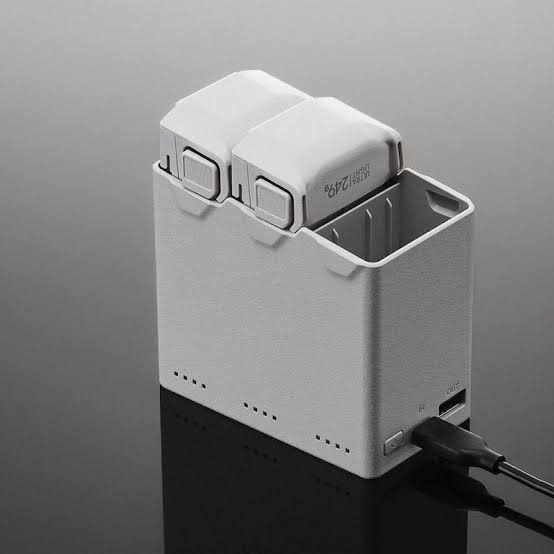
Key Specifications of the DJI Mini 3 Pro – Charging Hub
To help you understand the hardware capabilities of the DJI Mini 3 Pro – Charging Hub, we have compiled the core electrical and physical parameters into this data table:
| Parameter | Specification Details |
|---|---|
| Model Identifier | CHX162-30 |
| Input Protocols | USB Power Delivery (USB PD 3.0) |
| Supported Electrical Inputs | 5V 3A / 9V 3A / 12V 3A |
| Max Charging Power Input | 30 Watts (Single active slot) |
| Auxiliary Output (USB-A) | 5V 2A (10W Maximum) |
| Operating Temperature Range | 5 degrees C to 40 degrees C (41 degrees F to 104 degrees F) |
| Hub Weight (Bare) | Approximately 80 grams |
| Dimensions | 110 x 35 x 30 mm |
| Compatible Batteries | BWX162-2453-7.38 (Standard) & BWX162-3850-7.38 (Plus) |
If you are planning to purchase this hub or stock up on extra flight packs, you can check current pricing and availability here: Check prices on Amazon for the DJI Mini 3 Pro – Charging Hub.
Sequential Charging Dynamics vs. Misconceptions
A common misconception among drone pilots is that a multi-slot terminal will charge all inserted batteries simultaneously. The DJI Mini 3 Pro – Charging Hub operates strictly through sequential charging. When three batteries are inserted into the terminal, the internal microcontroller evaluates the State-of-Charge (SoC) across every docked pack.
Rather than splitting 30 Watts of input power across three slots (~10W per slot), which would result in all three batteries taking hours to reach flight readiness, the hub prioritizes power delivery. It directs the full 30W stream into the battery that has the highest remaining charge. Once that pack reaches 100% capacity and its status LEDs turn solid green, the hub immediately redirects power to the battery with the next highest voltage level.
Sequential Charging Priority Workflow
- Scan & Evaluate: The hub checks connected battery levels (e.g., Pack A: 75%, Pack B: 20%, Pack C: 45%).
- Phase 1: Directs 30W PD to Pack A (75% to 100%), delivering a flight-ready battery in minutes.
- Phase 2: Shifts 30W PD to Pack C (45% to 100%).
- Phase 3: Shifts 30W PD to Pack B (20% to 100%).
This intelligent priority logic guarantees that a pilot obtains a usable, fully charged battery in the shortest possible timeframe. If you need more practical advice on managing gear for travel and field shoots, explore our guide on Essential Camera & Drone Gadgets.
Charge Durations and Thermal Throttling
How fast does the DJI Mini 3 Pro – Charging Hub actually charge your batteries? Recharge times depend on whether you are using Standard Intelligent Flight Batteries (2453 mAh / 18.1 Wh) or Intelligent Flight Battery Plus units (3850 mAh / 28.4 Wh), as well as the output rating of your wall charger. Below is a breakdown of charging performance based on a 30W USB PD power source:
| Battery Variant | Capacity / Weight | Hub Time (30W PD) | In-Aircraft Charging | Full Set (3 Hub Slots) |
|---|---|---|---|---|
| Standard Flight Battery | 2453 mAh / 80.5g | ~56 minutes | ~64 minutes | ~3 hours (180 mins) |
| Intelligent Flight Battery Plus | 3850 mAh / 121g | ~78 minutes | ~101 minutes | ~4 hours (240 mins) |
Notice that charging inside the hub is approximately 12% to 23% faster than charging inside the drone fuselage. This speed increase occurs because the hub’s open-frame design allows passive airflow to dissipate heat effectively. In contrast, charging inside the drone traps ambient heat, causing the flight controller to reduce charging speeds to prevent overheating.
Thermal management is built directly into the firmware of the CHX162-30 hub. If you land your drone after an intensive flight and immediately plug a hot battery into the hub, internal thermistors detect if core temperatures exceed 45 degrees C. Charging on that specific slot will pause until passive cooling brings the cell temperature back within safe parameters (5 degrees C to 40 degrees C).
Two-Way Power Bank Functionality in the Field
The “Two-Way” designation in the official product name refers to its bidirectional energy routing. When you disconnect the hub from an AC outlet, docked flight batteries convert into an external battery bank outputting power through the USB-A port at up to 5V 2A (10W max).
Interestingly, when acting as a power bank, the DJI Mini 3 Pro – Charging Hub reverses its priority logic. Instead of draining the fullest battery first, it drains the battery with the lowest remaining charge down to zero before moving to the next. This inverse logic ensures that your fullest flight battery is preserved as long as possible in case you need to put the drone back in the air.
“In power bank mode, draining the partially used battery first keeps your 100% full packs intact for unexpected flight opportunities.”
With three fully charged Intelligent Flight Battery Plus units loaded, the hub holds roughly 85.2 Wh of energy. Accounting for step-down conversion loss (~85% efficiency), you get about 72 Wh of usable output. That is enough reserve capacity to charge a DJI RC smart controller (18.72 Wh) nearly four times or fully top off a modern smartphone twice. To explore more about unboxing setup tips, check out our write-up in the Unboxings Section.
Dual Charging Priority and Manual Override Controls
If you connect the charging hub to wall power while an external device (such as a smartphone or controller) is plugged into the USB-A output, an internal power circuit manages priority:
- Default Mode (Battery Priority): Input power focuses exclusively on charging drone batteries. The USB-A output stays idle until all docked batteries reach 100%.
- Manual Override (Device Priority): Pressing and holding the Function Button for two seconds shifts priority to the USB-A port. Drone battery charging pauses to charge your mobile phone or remote control.
- Automatic Safety Fallback: After the external device finishes charging, or if 4 hours pass, the hub automatically switches back to charging the drone batteries.
To upgrade your field setup with official charging gear, grab yours here: Shop for the official DJI Mini 3 Pro Charging Hub on Amazon.
Cross-Generational Compatibility Matrix
As DJI expanded the Mini line with the Mini 3 (standard) and Mini 4 Pro, battery dimensions remained identical across these frames. However, subtle differences exist regarding voltage management and firmware handshakes. Below is the full compatibility matrix for the DJI Mini 3 Pro – Charging Hub (CHX162-30):
| Aircraft Family | Battery Variant | Specs | Hub Status | Operational Notes |
|---|---|---|---|---|
| Mini 3 / Mini 3 Pro | Standard Flight Battery | 2453 mAh / 7.38V | Native Match | Keeps aircraft weight under 249 grams. |
| Mini 3 / Mini 3 Pro | Flight Battery Plus | 3850 mAh / 7.38V | Native Match | Extended flight time; pushes weight past 249g. |
| Mini 4 Pro | Standard Flight Battery | 2590 mAh / 7.32V | Fully Supported | Higher energy density cells; fully supported by CHX162-30. |
| Mini 4 Pro | Flight Battery Plus | 3850 mAh / 7.38V | Fully Supported | Hardware identical to Mini 3 Series Plus packs. |
While Mini 3 Series batteries can power a Mini 4 Pro drone, note that Mini 3 standard batteries (2453 mAh) have a slightly lower capacity than Mini 4 Pro standard batteries (2590 mAh). The CHX162-30 hub will safely charge all these battery models without issue. For related coverage on smart device compatibility, check our posts tagged under Foldable Phones and Field Tech.
Diagnostic LED Status Codes & Troubleshooting
The front panel of the DJI Mini 3 Pro – Charging Hub contains four LED indicators per battery slot. These lights display real-time charge state, charging speed, and error codes. Here is how to decode these status patterns:
- Fast Cycling Array: Fast charging is active under a valid USB PD handshake (9V/3A or 12V/3A).
- Slow Cycling Array: Slow charging due to a legacy power supply (<5V/2A input).
- Solid Green Array: Battery is 100% fully charged and ready for flight.
- Solid Red Array: Input overvoltage or internal hardware power rail failure. Disconnect power immediately.
- Blinking Yellow Array: Thermal protection active. Cell temperature is out-of-bounds (<5 degrees C or >40 degrees C). Allow the battery to rest at room temperature.
| LED Pattern | Root Cause | Recommended Action |
|---|---|---|
| LED 4 Blinks 3x / Sec | Temperature Out-of-Bounds | Allow battery to cool down or warm up to room temperature. |
| LED 2 Blinks 3x / Sec | Data Contact / Short Circuit | Clean metal contact pins with isopropyl alcohol. |
| No LEDs when plugged in | Deep Hibernation State | Leave plugged into a 30W PD charger for 1-2 hours to revive BMS. |
Battery Maintenance, Cell Balancing, and Health Protocols
To ensure long service life from your expensive Intelligent Flight Batteries, proper maintenance is essential. Lithium-polymer (LiPo) chemistry suffers degradation if stored at maximum voltage for extended periods.
When storing batteries for longer than 10 days, allow them to auto-discharge down to a 40% to 65% charge state (indicated when the 3rd LED blinks or stays solid). Never store batteries completely empty; doing so can cause cell voltages to drop below 3.0V, placing the internal Battery Management System (BMS) into deep hibernation. If a battery enters hibernation, leave it docked in the DJI Mini 3 Pro – Charging Hub connected to a 30W PD charger for up to two hours to apply a gentle trickle recovery current.
Every three months, perform a full cell calibration: charge the battery to 100% in the hub, fly the drone until the battery drops to 15%, let it cool, and recharge it back to 100%. This routine recalibrates the internal fuel gauge and keeps individual cell voltages balanced.
Airline Regulations & Travel Compliance (TSA & IATA Rules)
When traveling with drone batteries, airline safety guidelines enforced by the TSA and IATA must be followed strictly. Lithium drone batteries are classified as dangerous goods during air transport.
- Carry-On Bags Only: Drone batteries are strictly prohibited in checked luggage. They must be kept inside your carry-on luggage where flight crews can respond immediately if a thermal event occurs.
- Watt-Hour Limits: Standard batteries (18.1 Wh) and Battery Plus units (28.4 Wh) fall far below the 100 Wh airline restriction tier, meaning no prior airline approval is needed.
- Terminal Protection: Storing batteries inside the DJI Mini 3 Pro – Charging Hub satisfies terminal insulation requirements, shielding contact pins from accidental short circuits against loose objects in your bag.
Pros and Cons
Before making a buying decision, consider the main advantages and drawbacks of the official DJI charging hub:
Pros
- Rapid sequential turnaround delivers a fully charged flight pack in under an hour.
- Versatile two-way power bank mode provides emergency power to controllers and phones.
- Compact, durable chassis functions as a safe storage case during transport.
- Direct BMS integration ensures safe thermal controls and cell monitoring.
- Cross-compatible across Mini 3, Mini 3 Pro, and Mini 4 Pro battery variants.
Cons
- Does not include a 30W USB-C wall adapter in the box.
- USB-A power bank output is capped at a modest 10W (5V 2A).
- Does not support parallel charging across all three slots simultaneously.
Official DJI Hub vs. Third-Party Chargers
Many pilots consider third-party multi-bay chargers (from brands like Hanatora or Yx) as budget alternatives. Third-party options often advertise parallel charging—splitting 60W of power across four slots simultaneously (~15W per slot). While this brings all connected batteries to 100% at the exact same time, it means you have to wait hours before any single battery is ready to fly.
Moreover, third-party chargers frequently lack authentic digital communication protocols with DJI’s internal Battery Management System, relying instead on simple voltage cutoffs. Over time, this increases the risk of cell imbalance and overheating. The official DJI Mini 3 Pro – Charging Hub remains the safer, more reliable option for protecting your battery investments over the long term.
Does the DJI Mini 3 Pro Charging Hub come with a charger brick?
Can I charge all 3 batteries at the same time?
Is the hub compatible with DJI Mini 4 Pro batteries?
Why are the LEDs on my charging hub blinking yellow?
Can I carry the charging hub with batteries on an airplane?
Verdict: Is the DJI Mini 3 Pro Charging Hub Worth Buying?
The DJI Mini 3 Pro – Charging Hub is an essential piece of kit for any serious drone pilot. Its intelligent sequential charging logic gets you back in the air fast, while its reverse power bank capability provides peace of mind when your remote controller or phone runs low in the field. Combined with robust build quality and native cross-generational support, it earns an enthusiastic recommendation for creators looking to streamline their aerial gear setup.
Follow TheKZVerse
Stay connected with TheKZVerse for the latest technical deep-dives, hardware reviews, and field guides! Follow our official social channels below:
- Website: https://thekzverse.com/
- Instagram: @thekzverse on Instagram
- Facebook: TheKZVerse on Facebook
- YouTube: TheKZVerse YouTube Channel
- TikTok: @thekzverse on TikTok
- Threads: @thekzverse on Threads
Have questions about your drone charging workflow? Leave a comment below or join the discussion across our social media platforms!
Subscribe to our email newsletter to get the latest posts delivered right to your email.
Comments