
Category: Tech Reviews | Unboxings
Unboxing My OMRON Blood Pressure Monitor – I’m 30+ and Tracking My Health
Getting real about adulting, testing out IntelliSense technology, and looking past the spec sheets to see if this medical gadget lives up to the doctor-recommended hype.
There comes a moment in every tech lover’s life when your shelf transitions from purely hosting RGB gaming mice and sleek foldable smartphones to practical everyday hardware. For me, that moment hit recently. I turned 30+, looked at my daily coffee intake, and realized it was time to level up my preventative health routine. I spent weeks searching for a device that offers the ultimate blend of clinical verification and smart ecosystem integration. That research led me straight to the undisputed heavy-hitting brand in home diagnostics: the OMRON Blood Pressure Monitor.
When searching for a vital statistics scanner, consistency is absolutely everything. This isn’t just another casual lifestyle tracker; it’s a device meant to provide definitive baseline data you can trust. In this extensive, hands-on review, we are doing a deep-dive exploration of OMRON’s current generation ecosystem. We will go step-by-step through the unboxing experience, dissect the setup layout, assess the structural comfort of their preformed cuffs, and determine if their signature app ecosystem makes health tracking seamless or frustrating for day-to-day users.
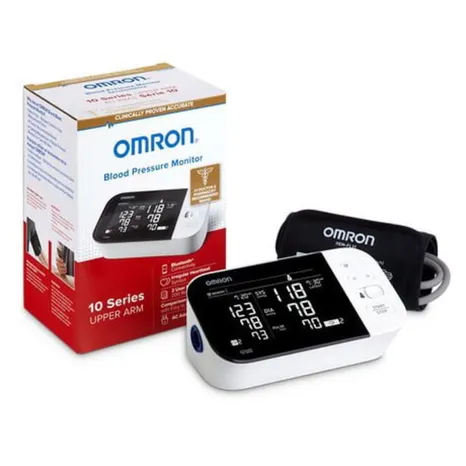
Unboxing the OMRON Blood Pressure Monitor: First Visual Impressions
The unboxing layout for OMRON’s current device generation centers on clean, structured packaging that trades loud marketing gimmicks for a highly organized, professional presentation. Ripping off the retail seal, the structural engineering of the box is immediately clear. Everything has an assigned protective compartment, ensuring the delicate digital pressure sensors are completely isolated during freight shipping.
Inside the package, you are greeted by the main monitor base station unit, the specialized upper arm cuff assembly, detailed structural placement manuals, and a convenient soft-fabric storage case to protect the components from dust and environmental degradation. Depending on the specific variation line you choose, you will either locate a standard set of four AA alkaline batteries or a dedicated AC wall power supply adapter. Pulling the main unit out of its protective film plastic, the premium build qualities show immediately. The housing is solid, robust, and completely built to withstand the rigors of multi-user daily household usage schedules.
“The physical base unit has a reassuring weight to it. It doesn’t slide across the table when you hook up the air lines, which makes single-handed operation incredibly straightforward.”
Getting the basic physical setup configured takes less than two continuous minutes. You simply open the bottom battery compartment hatch, slide in the included power cells, and attach the plastic air line hose connector into the deep reception port on the left flank of the structural frame. The click mechanism is completely secure, confirming an airtight seal that is critical for precise oscillometric analysis cycles. For more technical hardware teardowns and detailed unboxings of the latest everyday gear, don’t forget to browse through our comprehensive TheKZVerse Tech Reviews Section.
Ecosystem Infrastructure: Navigating the OMRON Product Matrix
OMRON’s product catalog uses a segmented hierarchy designed to accommodate varying customer requirements, ranging from simple budget-friendly monitors to advanced multi-user health stations. Understanding how these variations differ is key to picking the right model for your home routine without overspending on features you don’t actually need.
- Entry-Level (3 Series / Bronze): Streamlined, single-user physical units focusing completely on core tracking essentials. These models emphasize one-touch operation, offering standard onboard storage memory for baseline data logs without complex custom settings.
- Mid-Range (5 Series / Silver): Built for multi-user environments or deeper historical comparisons. These systems introduce dual-user tracking toggles, larger memory allocations, visual hypertension warning alerts, and wireless smartphone sync compatibility.
- Premium Diagnostics (7 Series / 10 Series / Platinum): The absolute top-tier desktop units. These models feature high-contrast dual backlit screens, TruRead automated multi-sequence averaging formulas, and OMRON’s proprietary AFib Screening Technology designed to spot signs of Atrial Fibrillation during standard monitoring cycles.
- Ultra-Portable Wireless (Evolv): A completely unique, tube-free, single-piece design that integrates the screen and pump mechanism directly onto the structural fabric cuff frame. It is optimized for frequent travelers and hybrid workers.
No matter which tier you choose, the underlying foundational diagnostic accuracy remains standard across the entire collection. Every unit features standard FDA clearance and complete clinical validation, guaranteeing premium monitoring quality across all budget brackets. To explore how home consumer technology is evolving across different categories, make sure to visit TheKZVerse Homepage for regular updates.
The Core Technology: How IntelliSense Controls Every Cycle
The primary innovation that sets a modern OMRON Blood Pressure Monitor apart from older digital health equipment is their proprietary IntelliSense technology. Traditional home monitors typically pump air to a rigid, pre-programmed pressure limit every single time, often resulting in painful over-inflation and skewed readings caused by physical discomfort.
The IntelliSense system utilizes an advanced fuzzy-logic software algorithm that measures pressure changes dynamically along the inflation curve. The base station analyzes the sub-surface oscillations of your brachial artery in real time, automatically capping the inflation cycle the exact millisecond it calculates the necessary threshold for an accurate measurement. This process significantly shortens testing times, maximizes physical comfort, and eliminates the artificial spikes in blood pressure caused by restrictive cuff pinching. It turns what used to be an uncomfortable medical chore into a smooth, pain-free daily habit.
Step-by-Step Guide for Flawless Measurement Accuracy
Even with advanced clinical validation, the absolute most common point of failure for home diagnostic tracking comes down to user technique. To ensure your home metrics consistently match the professional equipment used in clinical medical offices, follow this strict operational sequence:
1. Pre-Testing Stabilization Window
Never take a reading immediately after walking up stairs, completing chores, or running errands. Sit quietly in a supportive chair for at least 5 full minutes prior to hitting the activation switch. Keep your back supported, your feet flat on the floor, and your legs uncrossed. Avoid caffeine, nicotine products, and intense exercise for 30 minutes before starting a test cycle.
2. Precise Cuff Placement Geometry
Expose your bare upper arm by rolling up your sleeve loosely, ensuring the fabric does not pinch or constrict the limb. Slide the OMRON wide-range D-ring or preformed ComFit cuff onto your arm, positioning the bottom fabric edge precisely 2 cm (about one inch) above your elbow crease. Rotate the sleeve frame until the air tube exits downward along the exact center line of your inner arm, running perfectly in parallel with your brachial artery.
3. Physical Posture & Alignment
Rest your arm gently on a flat table or desk surface so the center of the arm cuff aligns perfectly with your heart level (mid-sternum). Keep your palm turned open facing upward towards the ceiling. Throughout the entire inflation and deflation countdown, maintain total silence and remain perfectly still.
“Do not talk, do not check your phone, and do not shift your weight. Even a quick sentence to answer someone in the room can easily throw off the sensors and alter your systolic values by several points.”
If you experience an unexpected error message or suspect a reading looks unusually high, simply rest quietly for two to three minutes before initiating another cycle. Premium models equipped with TruRead averaging functionality handle this sequence automatically, running three consecutive measurements with built-in rest intervals to calculate a highly reliable composite reading.
Key Technical Specifications Matrix
To help you see how the different models compare across the modern lineup, this technical specifications reference grid details the core differences across performance categories:
| Performance Feature | 3 Series Entry-Level | 5 Series Mid-Range | 10 Series / Platinum | Evolv Wireless |
|---|---|---|---|---|
| Measurement Method | Oscillometric Automatic | Oscillometric Automatic | Oscillometric Automatic | Oscillometric Automatic |
| Onboard Data Memory | 1 User × 14 Logs | 1 User × 30 Logs | 2 Users × 100 Logs | 1 User × 100 Logs |
| App Integration | Bluetooth / OMRON Connect | Bluetooth / OMRON Connect | Bluetooth / OMRON Connect | Bluetooth / OMRON Connect |
| Diagnostic Screens | Standard LCD Screen | High-Contrast Display | Dual Backlit LCD | Integrated OLED Sleeve |
| AFib Detection | No (Standard Pulse Only) | No (Standard Pulse Only) | Yes (Advanced Screening) | No (Standard Pulse Only) |
| Power Configuration | 4 × AA Batteries Only | 4 × AA Batteries Only | AC Wall Adapter Included | 4 × AAA Batteries Only |
| Clinical Precision | ±3 mmHg Pressure | ±3 mmHg Pressure | ±3 mmHg Pressure | ±3 mmHg Pressure |
Ecosystem Comparison: OMRON vs. Competitor Options
When selecting a smart health device, it helps to analyze how the platform stacks up against its primary market alternatives, such as the Samsung Galaxy Z Fold ecosystem or specialized diagnostic equipment from competitors like Withings and Beurer.
| Evaluation Category | OMRON Health Ecosystem | Withings Smart Series | Beurer Digital Monitors |
|---|---|---|---|
| Clinical Legacy | Industry Standard (#1 Doctor Recommended) | Consumer Tech Focused | European Clinical Standard |
| Data Privacy Sync | HIPAA-Compliant Server Frameworks | Cloud-Centric Fitness Ecosystem | Local Device Storage Focus |
| Cuff Versatility | Standard 9–17″ Preformed ComFit | Flexible Fabric Wraps | Adjustable Soft D-Rings |
| Averaging Formulas | TruRead 3-Phase Software Analysis | Baseline App Computations | Standard 3-Reading Averages |
While consumer-focused fitness brands excel at sleek design profiles and premium app animations, the OMRON Blood Pressure Monitor remains the preferred choice for clinical application. Its specialized focus on diagnostic tracking gives it a distinct advantage in reliability, providing clean data histories that doctors can confidently use for medical evaluations. For more deep dives into advanced consumer electronics and smart household upgrades, check out our full collection in TheKZVerse Tech Category.
Real-World Performance Impressions & Quirks
After using this monitor daily for an extended testing period, I’ve found that its real-world performance looks past the standard marketing specs. The day-to-day usability of the hardware is excellent. The buttons are large, clearly labeled, and tactile, making it incredibly straightforward to take an accurate reading first thing in the morning when you’re still half-asleep.
The companion app integration via Bluetooth is another standout feature. Once paired with the OMRON Connect app, readings sync smoothly in the background, transforming your raw stats into clean, actionable weekly and monthly trend charts. This makes it simple to export your long-term health logs into a neat PDF report that you can instantly share with your family physician during regular checkups.
However, no tech review on TheKZVerse is complete without covering the everyday quirks and pain points. First, the standard entry-level 3 Series features a noticeably short air hose connection line. If your bedside table or desk setup sits slightly low, you might find yourself having to lean forward uncomfortably to keep from pulling on the cord, which can accidentally compromise your testing posture.
Second, let’s look closely at the advanced 10 Series and Platinum models. If the device spots an active irregular rhythm or potential atrial fibrillation during a test cycle, the software safety framework handles it aggressively: it displays a bold visual AFib warning icon and completely hides your blood pressure numbers from the display screen for that attempt. While this choice is intended to prevent users from relying on compromised data, it can be surprising for new owners who aren’t expecting it based on the retail packaging details.
“The first time a sync error hits or a number gets hidden due to a loose cuff, it can be a bit frustrating. But once you master your posture and understand the software’s built-in safety rules, the tracking becomes incredibly consistent.”
Additionally, the standard preformed wide-range cuff ($22\text{–}42\text{ cm}$) is optimized to fit a wide variety of adult arm shapes, but it can feel a bit loose or bulky on very slim or petite individuals. If your arm circumference falls below the baseline threshold, you will want to purchase the specialized smaller `HEM-CS24` accessory cuff to ensure your sensor data stays highly accurate. For premium power accessories and compatible storage upgrades, check out the curated selection available at Shop OMRON Ecosystem Accessories on Amazon.
The Pros & Cons Breakdown
The Pros (Why We Recommend It)
- Verified Sensor Precision: Full clinical validation ensures trusted, medical-grade $\pm3\text{ mmHg}$ baseline tracking accuracy.
- IntelliSense Comfort Algorithm: Dynamic inflation software prevents uncomfortable arm pinching and eliminates artificial, discomfort-induced reading spikes.
- Seamless Digital Logs: The OMRON Connect app automatically converts daily data into clear, shareable trend reports for your healthcare team.
- Robust Build Quality: The base station frame features a sturdy, durable construction built for years of regular household use.
The Cons (Real-World Limitations)
- Short Hose Lengths: Entry-level variations feature compact air line tubing that requires careful device placement to maintain proper posture.
- Strict Sizing Requirements: Petite or very thin individuals will need to purchase a separate small-size cuff accessory to avoid elevated readings.
- Diagnostic Data Lockout: Premium AFib screening variations hide numerical blood pressure data during active pulse anomalies to prevent reliance on distorted readings.
Take Charge of Your Daily Wellness Routines
Monitoring your long-term health metrics doesn’t have to be a complicated medical chore. Investing in a reliable, clinically proven diagnostic tool provides real peace of mind that pays off for years to come.
Secure Your OMRON Blood Pressure Monitor Now!
OMRON Blood Pressure Monitor: Frequently Asked Questions
Are home OMRON Blood Pressure Monitors genuinely accurate?
What exactly does the IntelliSense inflation software do?
Why does my OMRON monitor screen show an irregular heartbeat warning icon?
Do I need to pay a subscription fee to use the OMRON Connect app?
How often does a home blood pressure monitor need to be recalibrated?
The Final Verdict: Is It Worth Your Money?
If you’re navigating the realities of adulting and looking for an effective, reliable way to track your preventative wellness metrics, an OMRON Blood Pressure Monitor is one of the single most practical tech purchases you can make. It sidesteps the flashy, unverified features of basic fitness trackers in favor of medical-grade data accuracy and long-term diagnostic reliability. While minor issues like short air hoses on entry-level units or picky Bluetooth sync cycles require a small learning curve, the clinical confidence and peace of mind this ecosystem provides make it an absolute essential for any modern home. It is a smart investment that delivers real, lasting value for your long-term health journey.
Follow TheKZVerse
Enjoyed this real-world tech deep dive? Subscribe to our community channels and never miss an unboxing or honest gear review!
Subscribe to our email newsletter to get the latest posts delivered right to your email.
Comments