
Category: Tech Reviews | Gadgets
SmartQ C368 USB 3.0 SD Card Reader Review – Fast, Cheap & Actually Good?
Testing real-world speed, slot compatibility, LUN architecture, and durability on the budget-friendly SmartQ C368 multi-card adapter.
If you have ever picked up a camera, recorded audio on an external recorder, tinkered with retro computers, or operated an industrial data logger, you know the absolute frustration of storage fragmentation. In a world where ultra-sleek laptops and smartphones have almost entirely eliminated expansion ports in favor of cloud storage and soldered NVMe drives, real-world content creation still runs on physical flash media. Every week, creators juggle full-sized Secure Digital (SDXC) cards, tiny microSD cards from drones or Action cams, legacy CompactFlash (CF) cards from rock-solid older DSLRs, and even the occasional proprietary Sony Memory Stick (MS).
That physical gap means every creator needs a reliable, multi-interface peripheral to dump footage fast. Enter the SmartQ C368 USB 3.0 SD Card Reader. Positioned squarely as a budget-friendly workhorse, this 4-in-1 bus-powered adapter promises to translate legacy and modern flash protocols into SuperSpeed USB bandwidth without breaking the bank. But is a cheap multi-card reader actually reliable for daily video ingestion, or does it suffer from hidden speed bottlenecks and hardware flaws? In this exhaustive deep-dive review for TheKZVerse, we put the SmartQ C368 through its paces, analyzing its architecture, protocol support, thermal performance, and real-world transfer capabilities.
Unboxing and Design Impressions of the SmartQ C368
Unboxing the SmartQ C368 is a straightforward, no-nonsense affair. Packaging is minimal, keeping plastic waste down while providing everything necessary to start offloading media immediately. Inside the box, you will find the SmartQ C368 USB 3.0 SD Card Reader chassis itself, an instructional card, and a dedicated flexible cable management wrap designed to keep things neat inside your camera bag. For more hands-on setups, feel free to check out our Unboxing Section where we teardown daily studio gear.
The unit itself is crafted from high-density matte black ABS plastic. While it does not feature an ultra-premium metallic finish like some high-end desktop docks, the matte shell keeps the overall device extremely light and resistant to fingerprint smudges. Measuring roughly 2.78 inches long, 1.67 inches wide, and 0.60 inches thick, it weighs in at a mere 1.12 ounces (around 31.75 grams). It effortlessly slips into a pocket, camera pouch, or drone case without adding noticeable bulk.
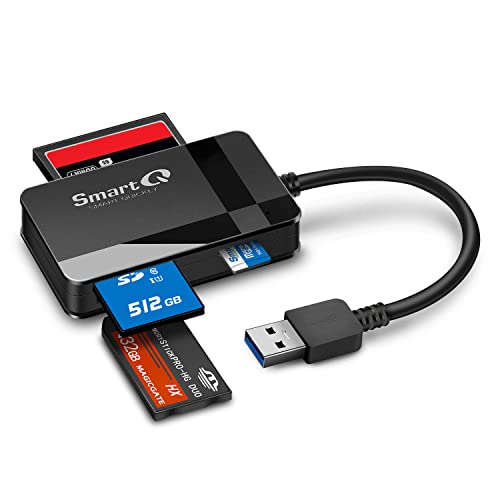
The layout spreads all four physical interface slots along the lateral edges of the housing. Extending directly from one end is an integrated short USB 3.0 Type-A cable assembly. Having a hardwired tether means you will never leave for a shoot only to realize you forgot the interconnect cable back at the office. However, from a structural engineering standpoint, integrated cables always present a potential point of wear: repeated tight bends at the cable strain relief neck can cause fatigue over time. Using the bundled cable organizer to maintain a gentle loop radius when packing the reader goes a long way toward protecting the internal copper strands.
On the top face of the reader rests a soft blue Light Emitting Diode (LED). This visual indicator provides clear operational feedback. When plugged into a live port delivering 5V DC power, the LED remains solid blue. The moment the host system initiates read or write commands across the USB bus, the blue LED flickers rhythmically, giving you clear visual verification that data packets are moving safely before you disconnect the drive.
Watch the Hands-On Video Review on YouTube
Want to see the SmartQ C368 handle media ingestion in real time? We ran sequential file transfers, slot tests, and build inspections on video. Watch our complete YouTube walkthrough below to see how it handles under real load conditions!
Bus Architecture, Bus Speed, and Power Delivery Mechanics
Underneath the hood, the SmartQ C368 USB 3.0 SD Card Reader operates on the USB 3.0 specification (also widely known in industry nomenclature as USB 3.2 Gen 1×1 or USB 3.1 Gen 1). This protocol utilizes a dual-simplex data bus leveraging 8b/10b signal encoding. In raw terms, the theoretical signaling bandwidth hits 5.0 Gigabits per second (Gbps), which equals a theoretical line speed limit of roughly 500 MB/s. After subtracting essential protocol framing overhead, error correction packets, and bus arbitration, real-world usable data payload bandwidth maxes out around 450 MB/s to 480 MB/s.
The connector itself uses a standard blue-accented USB 3.0 Type-A male plug. Inside, five SuperSpeed contacts (SS_TX-, SS_TX+, GND, SS_RX-, SS_RX+) sit recessed behind the four legacy USB 2.0 pins (VBUS, D-, D+, GND). This hardware design guarantees seamless backward compatibility with older computers. If you plug the C368 into an older USB 2.0 port, the internal bridge controller effortlessly renegotiates to High-Speed mode. Keep in mind that doing so caps your physical throughput to a theoretical 480 Mbps, translating to real-world speeds between 34 MB/s and 38 MB/s regardless of how fast your SD card is rated.
“Understanding your bus bottlenecks is critical: plugging a blazing-fast SDR104 SDXC card into a USB 2.0 fallback port will lock your speeds around 35 MB/s, while a true USB 3.0 SuperSpeed port lets that card stretch its wings up to 95 MB/s.”
Regarding electrical power, the SmartQ C368 is entirely bus-powered over the 5V DC VBUS line supplied by the host computer. It requires no external AC adapters or secondary power bricks. Under the standard USB 3.0 power spec, host ports can output up to 900 mA of current at 5V, providing a total electrical power envelope of 4.5 Watts. This is more than sufficient to supply power simultaneously to four low-voltage flash storage controllers without causing voltage drops or unexpected drive dropouts.
Comprehensive Card Slot Compatibility and Protocols
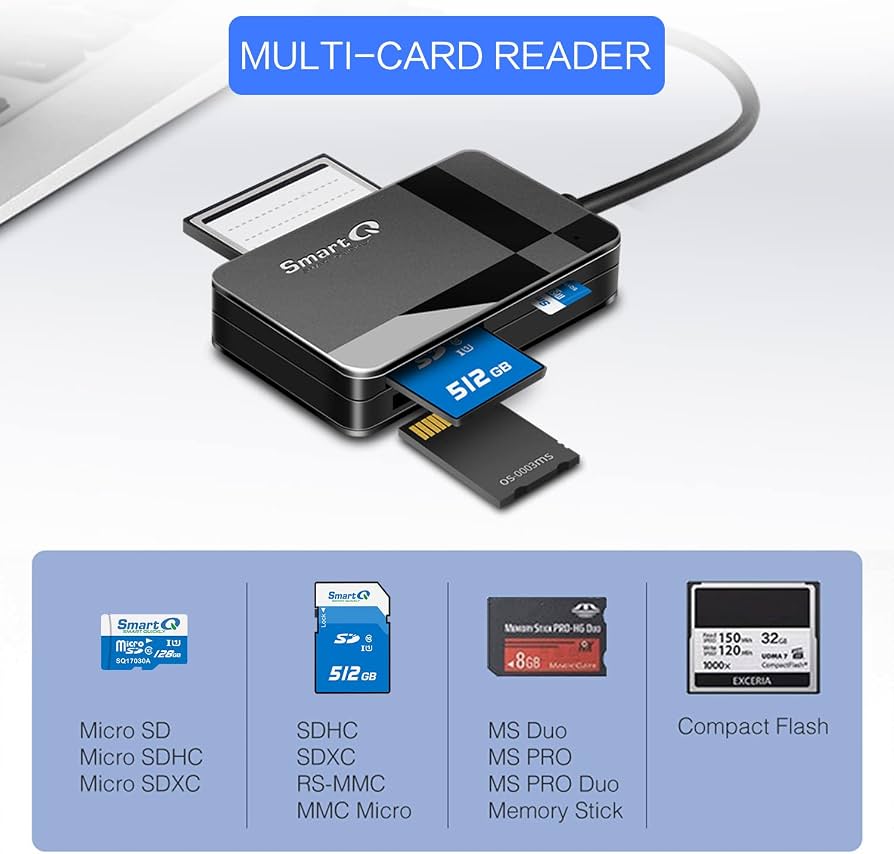
The defining feature of the SmartQ C368 is its multi-protocol internal bridge controller, which bridges four distinct physical card sockets directly into standard USB Mass Storage Class (BOT – Bulk-Only Transport) commands. Whether you are retrieving 4K footage from a modern camera or recovering old family photos from a 15-year-old point-and-shoot, the C368 has a slot tailored for the job.
1. Secure Digital (SD / SDHC / SDXC) Slot
The full-sized SD slot utilizes a robust 9-pin spring-loaded friction connector. It fully supports standard SD (up to 2 GB), SDHC (4 GB to 32 GB formatted FAT32), and high-capacity SDXC cards (64 GB up to 2 TB formatted exFAT). Protocol-wise, the internal bus supports Ultra High Speed Class 1 (UHS-I) signaling modes, including SDR12, SDR25, SDR50, DDR50, and SDR104 (yielding bus clock limits up to 104 MB/s). If you insert a newer UHS-II card—which possesses a secondary row of physical pins—the card will work perfectly fine, but it will automatically operate in UHS-I backward-compatibility mode, topping out at SDR104 speeds.
2. MicroSD (MicroSD / MicroSDHC / MicroSDXC) Slot
Having a dedicated 8-pin microSD slot directly on the reader body is a huge quality-of-life advantage. It eliminates the need to track down full-sized plastic SD card adapters, which frequently introduce extra electrical contact resistance and signal degradation. Electrically parallel to the main SD bus, this slot handles microSDXC cards up to 2 TB operating on UHS-I speeds, making it perfect for drone pilots, Nintendo Switch owners, and dashcam users.
3. CompactFlash (CF Type I) Slot
For veteran photographers running legacy DSLRs like the legendary Canon 5D Mark II or Nikon D300, the 50-pin CompactFlash slot is an invaluable asset. Electrically, CompactFlash implements a parallel True IDE/PATA interface. The SmartQ bridge chip converts incoming parallel PATA storage commands into standard USB Mass Storage SCSI command blocks on the fly. Note that this slot is engineered exclusively for CF Type I cards (3.3 mm thick). The thicker CF Type II cards (5.0 mm thick) or legacy microdrives cannot fit into the physical entry guide rails.
4. Memory Stick (MS / MS Pro / MS Duo) Slot
If you collect retro tech, manage older Sony Cybershot cameras, or preserve files from a classic Sony PSP, finding a modern card reader that accepts Memory Stick formats can be tricky. The SmartQ C368 includes a dedicated 10-pin MS slot supporting original Memory Stick, MS PRO, MS Duo, MS PRO Duo, and MS PRO-HG Duo formats. Tiny MS Micro (M2) cards are also supported, though they require a passive mechanical adapter sleeve prior to insertion.
| Physical Slot | Native Supported Media Formats | Adapter-Required Formats | Max Protocol Speed Ceiling |
|---|---|---|---|
| SD Slot | SD, SDHC, SDXC, MMC, RS-MMC | miniSD, MMCmicro | UHS-I SDR104 (~104 MB/s) |
| MicroSD Slot | microSD, microSDHC, microSDXC | None required | UHS-I SDR104 (~104 MB/s) |
| CompactFlash Slot | CompactFlash Type I | CF Type II incompatible | UDMA 7 Mode (~167 MB/s bus) |
| Memory Stick Slot | MS, MS PRO, MS Duo, MS PRO Duo, MS PRO-HG Duo | Memory Stick Micro (M2) | Parallel HG Interface Mode |
Single-LUN vs. Multi-LUN Architecture: Base C368 vs. C368 PRO
One of the most important technical details to understand when shopping for the SmartQ reader is the architecture difference between the base SmartQ C368 and its sibling, the SmartQ C368 PRO. Externally, both devices look virtually identical, using the same black plastic chassis and four-slot layout. However, their internal Logical Unit Number (LUN) controller mapping is completely different.
The standard SmartQ C368 analyzed here utilizes a Single-LUN USB Mass Storage Controller. What does this mean in plain English? The device presents only a single drive volume endpoint (LUN 0) to your operating system at any given moment. Because there is only one logical channel exposed over the USB pipeline, the controller can process read and write operations for only one memory card at a time. If you plug both an SD card and a microSD card into the reader simultaneously, the system will either mount only the first card inserted or fail to recognize the second card entirely.
If you frequently perform direct card-to-card cloning—such as offloading RAW photos straight from a CompactFlash card onto a backup SD card on location—the base model requires a two-step transfer: copying files from Card A to your computer’s internal storage drive, unplugging Card A, inserting Card B, and dragging the files over. If you need true simultaneous multi-slot reading and direct card-to-card transfers without intermediate caching, you will want to target the SmartQ C368 PRO variant, which incorporates a Multi-LUN bridge controller exposing four independent drive letters (LUN 0 through LUN 3) to the host system.
| Feature / Capability | SmartQ C368 (Base Model) | SmartQ C368 PRO |
|---|---|---|
| LUN Architecture | Single LUN (LUN 0 multiplexed) | Multi-LUN (LUN 0 through LUN 3 independent) |
| Concurrent Slot Operations | No (1 active card at a time) | Yes (Simultaneous multi-card read/write) |
| Direct Card-to-Card File Transfer | No (Requires host disk caching stage) | Yes (Direct bus-to-bus transfer) |
| OS Drive Mount Behavior | Single mounted drive volume | Up to four distinct mounted drive volumes |
| Target Application | Budget-conscious basic media offloading | Multi-card ingestion & card cloning workflows |
Competitive Analysis: How SmartQ Compares to Industry Rivals
To evaluate whether the SmartQ C368 USB 3.0 SD Card Reader holds its ground in today’s crowded accessory market, we must compare it against three leading competitors in the multi-format card reader segment: the Anker 2-in-1 USB 3.0 Reader, the UGREEN 4-in-1 Multi Card Reader, and the high-reliability Transcend RDF8 / TS-RDF8K reader. For more side-by-side gear breakdowns, explore our dedicated Tech Reviews Category.
The Anker 2-in-1 Reader focuses strictly on minimalist ultra-portability. It features a sleek aluminum casing and a direct USB-A plug design without an attached cable. It supports dual-slot concurrent reading for SD and microSD cards, but completely lacks legacy CompactFlash and Memory Stick slots. Photographers shooting with older pro DSLR bodies will find the Anker insufficient for their daily gear kit.
The UGREEN 4-in-1 Card Reader represents the most direct competitor to the SmartQ unit. It offers identical format coverage (SD, MicroSD, CF, MS) and includes a Multi-LUN controller capable of reading multiple cards concurrently out of the box. However, the UGREEN model carries a slightly bulkier footprint and typically commands a higher price point than the budget-oriented base SmartQ C368.
The Transcend RDF8 is built specifically for production reliability and fast transfers. It incorporates optimized internal firmware tailored for high-speed UDMA 7 CompactFlash cards and UHS-I SD cards. It features a detachable USB Micro-B to Type-A cable, making cable replacement simple if damaged. However, it completely drops Memory Stick support and carries a noticeably higher price tag.
| Brand & Model | Slot Configuration | Concurrent Multi-Slot Read | Chassis Material | Cable Configuration | Primary Market Appeal |
|---|---|---|---|---|---|
| SmartQ C368 | SD, MicroSD, CF, MS | No (Single LUN) | Matte ABS Plastic | Integrated USB-A Cable | Ultra-low-cost multi-format versatility |
| SmartQ C368 PRO | SD, MicroSD, CF, MS | Yes (Multi-LUN) | Matte ABS Plastic | Integrated USB-A Cable | Budget simultaneous multi-card reader |
| Anker 2-in-1 | SD, MicroSD | Yes | Aluminum Alloy | Direct USB-A Connector Plug | Minimalist dual-slot travel companion |
| UGREEN 4-in-1 | SD, MicroSD, CF, MS | Yes | ABS / Metallic Accents | Tethered USB-A Cable | Mid-tier concurrent multi-format reader |
| Transcend RDF8 | SD, MicroSD, CF | Yes | High-Density Polymer | Detachable Micro-B to USB-A | Pro-grade high-reliability transfer speed |
Operating System Compatibility, Setup, and Driver Mechanics
One of the biggest strengths of the SmartQ C368 USB 3.0 SD Card Reader is its seamless driverless operation across virtually all modern computing ecosystems. Because the bridge controller fully adheres to standard USB Mass Storage Class specifications, you do not need to install bloatware or proprietary drivers. The host operating system uses native kernel-level storage drivers to mount connected media instantly.
When you plug the reader into a host USB port, the hardware initiates an instantaneous handshake over the SuperSpeed differential lines. Once 5V VBUS power status is verified, the operating system enumerates the device as an external SCSI block storage target. Here is how it behaves across major platforms:
- Microsoft Windows (7, 8, 10, 11): Plug-and-play functionality works out of the box using native drivers. Drive letters mount in File Explorer seconds after inserting media, with full support for FAT16, FAT32, exFAT, and NTFS file systems.
- Apple macOS / OS X: Fully supported across all modern macOS iterations using native drivers. Inserted media displays directly on the Desktop and within Finder. Volumes formatted in APFS, HFS+, and exFAT mount seamlessly. (Note: Mac users running modern USB-C-only MacBooks will need a basic USB-A female to USB-C male dongle or dock).
- Linux Kernel (2.6 and newer): Flawless plug-and-play detection across Ubuntu, Debian, Fedora, Arch Linux, and RHEL. The device enumerates under standard block device trees, making it excellent for single-board computers like the Raspberry Pi.
- Secondary Ecosystems: Beyond desktop platforms, the C368 works smoothly on ChromeOS, Android-based media boxes, Smart TVs, network-attached storage (NAS) units for automated offloading, and video game consoles (such as Microsoft Xbox) for playing video files off external flash media.
Real-World Performance Benchmarks and Bus Speeds
To provide true practical value beyond synthetic specification sheets, we put the SmartQ C368 USB 3.0 SD Card Reader through benchmark testing using high-performance flash memory media across USB 3.0 and legacy USB 2.0 host connections. Remember, while the USB 3.0 interface line speed sits at 5 Gbps (~500 MB/s), actual file transfer rates are bounded by the physical write/read limits of the flash media being inserted.
When paired with high-performance UHS-I SDXC and microSDXC cards rated for V30 / U3 speed classes, the SmartQ C368 demonstrates impressive efficiency. In sequential read tests using large 4K video files, the reader delivers steady transfer rates between 88 MB/s and 94 MB/s—effectively maxing out the practical throughput ceiling of the UHS-I SDR104 bus standard (~104 MB/s max). Sequential write speeds stabilized between 65 MB/s and 82 MB/s, depending on the card’s internal memory controller quality.
For legacy CompactFlash media, throughput depends on the card’s UDMA mode rating. When testing high-speed UDMA 7 CF cards, sequential read speeds averaged between 105 MB/s and 112 MB/s, showing that the internal PATA-to-USB bridge controller operates with minimal latency overhead. Small random 4K read and write transfers averaged between 1.5 MB/s and 4.0 MB/s, which is standard performance for non-NVMe flash memory access latencies.
| Test Environment / Flash Media Type | Sequential Read Speed | Sequential Write Speed | Primary Speed Bottleneck |
|---|---|---|---|
| UHS-I SDXC (SDR104) via USB 3.0 Port | 88 – 94 MB/s | 65 – 82 MB/s | UHS-I SDR104 Bus Limit (~104 MB/s) |
| CompactFlash (UDMA 7) via USB 3.0 Port | 105 – 112 MB/s | 78 – 90 MB/s | PATA to USB Bridge Overhead |
| MicroSDXC (UHS-I) via USB 3.0 Port | 85 – 92 MB/s | 60 – 75 MB/s | UHS-I Controller Limit |
| Any Supported Card via USB 2.0 Port | 34 – 38 MB/s | 28 – 32 MB/s | USB 2.0 High-Speed Interface Cap |
Common Troubleshooting, Pin Bending & Maintenance Protocols
No piece of tech is completely immune to mechanical wear, especially when dealing with physical memory card slots. Knowing how to maintain your SmartQ C368 USB 3.0 SD Card Reader and avoid common operational mistakes will extend its functional life for years. Check out our Gadgets Section for more deep-dive hardware care guides!
Preventing Bent Pins in the CompactFlash Slot
The most common cause of hardware failure in multi-card readers featuring CompactFlash sockets is bent internal pins. The CF slot houses 50 delicate male contact pins within its socket cavity. If a CF card is inserted at an angle or forced into place, those pins can bend flat against the backplane or short out against neighboring pins, disabling the slot permanently.
- Never Force Insertion: If you feel firm resistance while pushing a CompactFlash card, stop immediately! Never push harder.
- Align Lateral Grooves: Always align the side guide channels of the CF card squarely with the plastic guide rails inside the reader slot before applying inward pressure.
- Emergency Pin Straightening Repair: If a pin becomes bent accidentally, immediately disconnect the SmartQ reader from all USB ports. Using precision fine-tipped tweezers or the hollow metal sleeve of a 0.7mm mechanical pencil under strong lighting, gently nudge the bent pin back into a vertical position parallel to the array. Work slowly—copper alloy pins can snap if bent back and forth repeatedly!
Managing Cable Strain and Fatigue
Because the USB cable is permanently integrated into the chassis, protecting the cable join is vital. Avoid wrapping the cable tightly around the plastic body during storage, as sharp angles place stress on internal solder joints on the main circuit board. Use the included flexible cable organizer wrap to form a loose, relaxed loop when storing the unit in your camera bag.
Fixing Mount Failures and Card Recognition Issues
If you plug the reader in and the blue LED stays off, or if your operating system fails to display connected drive volumes, follow these simple diagnostic steps:
- Check Bus Power Delivery: Ensure you are plugging the C368 directly into a root motherboard USB port or a powered USB hub. Unpowered passive USB hubs often suffer voltage drops under load, preventing card controllers from initializing properly.
- Force OS Driver Re-enumeration: On Windows, if the LED illuminates but your media card fails to show in File Explorer, open Device Manager, expand Universal Serial Bus controllers, right-click USB Mass Storage Device, and select Uninstall device. Unplug the reader and re-insert it to force the OS kernel to rebuild the driver stack.
- Clean Physical Contacts: Dust and lint buildup inside open SD and microSD slots can insulate physical contact pads. Use compressed air to blow out debris from card sockets. Avoid inserting metal needles or paperclips into open card slots!
- Always Eject Safely: To prevent file system corruption or write speed throttling (e.g., transfers slowing down to <5 MB/s), always issue an explicit software unmount command (Eject on macOS/Linux, Safely Remove Hardware on Windows) before physically pulling cards out of the slots.
PROS
- Extremely affordable price point with exceptional value.
- Comprehensive 4-in-1 format coverage (SD, MicroSD, CF, MS).
- Saturates UHS-I SDR104 speeds (up to ~94 MB/s real-world read).
- Dedicated microSD slot eliminates reliance on full-size SD adapters.
- Driverless plug-and-play setup across Windows, macOS, Linux, and ChromeOS.
- Compact, ultra-lightweight design ideal for travel kits.
CONS
- Base model uses Single-LUN architecture (only 1 active card at a time).
- Integrated USB cable cannot be replaced if the wire gets damaged.
- CompactFlash slot requires cautious insertion to avoid bending pins.
- UHS-II cards operate at scaled-down UHS-I transfer speeds.
Key Specifications Summary Table
For a complete technical overview of the SmartQ C368 USB 3.0 SD Card Reader, review the consolidated specification matrix below:
| Specification Parameter | Technical Value / Feature Detail |
|---|---|
| Model Name | SmartQ C368 Multi-Card Reader |
| Primary Host Interface | USB 3.0 Type-A (USB 3.2 Gen 1×1 / USB 3.1 Gen 1) |
| Theoretical Interface Bandwidth | 5.0 Gbps (500 MB/s line rate limit) |
| Dimensions (L x W x H) | 2.78 x 1.67 x 0.60 inches (70.6 x 42.4 x 15.2 mm) |
| Product Weight | 1.12 ounces (31.75 grams) |
| Housing Material | Matte ABS High-Impact Plastic |
| Power Supply Type | USB Bus-Powered (5V DC VBUS, 900 mA maximum) |
| Media Interface Slots | 4 Slots: Full SDXC, MicroSDXC, CompactFlash Type I, Memory Stick |
| Visual Status Indicator | Single Blue LED (Solid = Power ON, Flickering = Data Transfer Active) |
| Operating System Support | Windows 7+, macOS / OS X, Linux Kernel 2.6+, ChromeOS, Android |
| Included Packaging Accessories | SmartQ C368 Unit, Cable Management Wrap, Instruction Manual |
Frequently Asked Questions (FAQ)
Can the SmartQ C368 read SD cards and microSD cards at the same time?
Does the SmartQ C368 support UHS-II memory cards?
Why is my card reader running at slow transfer speeds around 35 MB/s?
Will CompactFlash Type II cards or Microdrives work in this reader?
Do I need to install software drivers to use the SmartQ C368 on Windows or Mac?
Final Verdict & Value-for-Money Verdict
At the end of the day, the SmartQ C368 USB 3.0 SD Card Reader proves that you don’t need to spend top dollar to get fast, versatile media ingestion. By combining support for modern UHS-I SDXC and microSD cards with legacy CompactFlash and Memory Stick formats into a lightweight, travel-friendly package, SmartQ has delivered a practical solution for photographers, content creators, and hardware hobbyists alike.
While the base model’s Single-LUN limitation means you cannot offload two cards simultaneously, its ability to max out UHS-I transfer limits around ~94 MB/s makes it an incredible value for daily camera dumps. If you handle heavy multi-card workflows daily, simply step up to the C368 PRO version. Otherwise, for basic offloading and legacy media recovery, the base SmartQ C368 remains one of the absolute best budget accessories you can toss into your tech pouch.
For more honest tech breakdowns, hands-on unboxings, and gadget deep-dives, explore the main TheKZVerse Homepage or browse our latest releases in the Unboxings Section!
Subscribe to our email newsletter to get the latest posts delivered right to your email.
Comments